Fix Capture Quality at the Source, Not in Your Pipeline
OCR and AI extraction start from the image you capture. Blurry scans still reach your pipeline. Free, open-source, and in-house tools work until folded pages, low light, or damaged codes show up. Scanbot Mobile Data Capture SDKs handle those cases on device, so your team builds and maintains less capture code.
Trusted by
400+
global
industry leaders










What Bad Input Costs Your Pipeline
A skewed claim photo, a folded bill of lading, a label that will not scan, an ID typed by hand. Each one lands in your pipeline as an exception someone must fix. Scanbot SDKs handle it on device, at the point of capture.

Fewer bad scans reaching OCR and AI
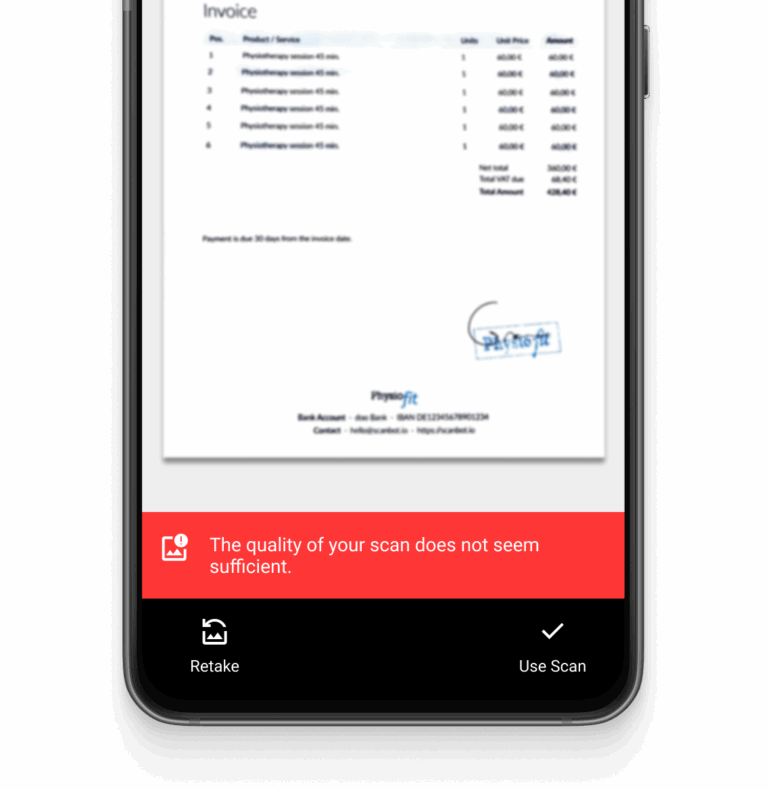
The Document Scanner SDK’s Document Quality Analyzer rates each capture and can prompt your user to retake a blurry one before submission. Auto-crop and perspective correction fix camera angle and tilt on device, and Document Straightener flattens pages that are not flat. No retake logic or preprocessing to build.

Fewer unreadable codes
Barcode Reconstruction rebuilds scuffed or torn barcodes from the parts that are intact. The Scanbot Barcode Scanner SDK reads damaged and low-light barcodes. Multi Scan reads several barcodes in a single scan, so one scan replaces several. Your team does not build workarounds for hard-to-read barcodes.

Less manual data entry
Data Capture Modules extract key-value fields on-device without custom extraction code. MRZ Scanner reads passports and IDs; Credit Card Scanner supports Visa, Mastercard, and Amex; Check Scanner reads MICR data; and Document Data Extractor supports German IDs, passports, driver’s licenses, residence permits, and EHICs. Data stays on device.
Explore the Mobile Data Capture Use Cases
-
Document Scanner SDK
Capture claim documents, onboarding packets, and bills of lading OCR-ready, on-device. The Document Quality Analyzer rates each capture and can prompt a retake before a blurry one reaches OCR or AI extraction, so your team builds no retake logic.
-
Barcode Scanner SDK
-
Data Capture Modules
-
Insurance & Banking Workflows
-
Retail Workflows
-
Logistics Workflows


Why Scanbot SDK?
Speed & UX
Scan multiple codes simultaneously. Deliver real-time feedback with augmented reality (AR) overlays. Make scanning easy for everyone with intuitive user guidance.
Full data privacy
Our SDK works offline, protecting your data by processing everything on-device. Without network connections, the software offers full data security and is GDPR- and CCPA-compliant by default.
Developer support
Questions or requests? Contact our technical support team. We're happy to assist you.
What Software-Based Capture Changes

Predictable Licensing
One flat annual fee per use case, with unlimited scans and unlimited devices. Your cost does not change as scan volume or device count grows.

Capture Across Your Platforms
Embed capture in iOS, Android, Web, React Native, Flutter, Capacitor, .NET MAUI, Linux, and Windows apps. Capture runs locally and offline.

Less Capture UI to Build
The Scanbot SDK provides Ready-To-Use UIs for easy customization with a few lines of code. This includes scanning modes, AR overlays, user guidance, and auto capture. Samples, documentation, and GitHub examples come with the SDKs.


Frequently Asked Questions
Why not use a free capture API or open-source library?
Free capture APIs and open-source libraries cover simple capture. For one platform with clean input and low volume, a free API is enough. The cost shows up around the decoder: folded pages, low light, and damaged codes, plus the retake prompts, quality checks, UI flows, export formats, and OS-update fixes your team writes and maintains.
Does the Scanbot SDK extract text or run AI on my documents?
The Scanbot SDK is data capture software for scanning barcodes, documents, and structured documents. It focuses on capturing high-quality scans so that any further processing you run on them gets the best possible input.
The Document Scanner SDK exports to JPG, PNG, TIFF, PDF, and searchable PDF, ready for your own OCR or downstream pipeline. The Data Capture SDK returns key-value pairs for easy backend processing.
Which structured documents can the Data Capture Modules read?
The Scanbot Data Capture Modules return key-value fields on-device from supported documents:
- MRZ Scanner: passports and ID cards, using the Machine Readable Zone.
- Document Data Extractor: standardized IDs, including German ID cards, passports, driver’s licenses, residence permits, and European Health Insurance Cards (EHIC).
- Credit Card Scanner: Visa, Mastercard, and American Express cards.
- Check Scanner (MICR): Paper checks in US, Canadian, French, Australian, Indian, Israeli, Kuwaiti, and UAE formats.
- VIN Scanner: Vehicle identification numbers.
- Text Pattern Scanner: Single-line strings that match a pattern you define.
- Medical Certificate Scanner: German medical certificates only.
How much does the Scanbot SDK cost?
Pricing is determined based on your data capture needs and the number of apps/domains you require. The Scanbot SDK license is a flat annual fee for unlimited scans on unlimited devices. Developer support, new features, and updates are included in your license. To request a custom quote, reach out to our Sales team.
Can I customize the scanning UI?
Yes. The Scanbot SDK provides Ready-To-Use UI Components that enable developers to customize the scanner UI with just a few lines of code. The Barcode Scanner SDK offers an AR overlay and pre-built scanning modes like Scan & Count or Find & Pick for specific use cases. Our Document Scanning RTU UI features user guidance, automatic capture and cropping, a review screen, and a Document Quality Analyzer.
If you need more flexibility, you can build with our Custom UI.
How do I test the Scanbot SDK?
You can request a free 7-day trial license to try the SDK in your own environment. For quick testing, you can download the demo apps. If you have any questions during integration, please reach out to our support team.
Which platforms and frameworks are supported?
The Barcode Scanner SDK and the Document Scanner SDK run on Android, iOS, Web, React Native, Flutter, Capacitor, .NET MAUI, Cordova, Kotlin Multiplatform, Linux, and Windows. The Data Capture Modules run on Android, iOS, Web, React Native, Capacitor, Linux, and Windows. On Flutter, .NET MAUI, and Cordova, they come bundled with the Document Scanner SDK. The documentation lists versions and details for each platform.