

Accurate and durable item identification is a foundational requirement in the defense industry. The U.S. Department of Defense (DoD) must be able to reliably identify, track, and manage millions of items across long service lives, multiple organizations, and diverse operational environments.
To achieve this, the DoD uses a standardized identification framework that combines policy, data rules, and physical marking requirements. In this article, we will discuss the cornerstones of this framework.
Understanding the core concepts
Item Unique Identification (IUID) is a policy framework that defines which items must be uniquely identified and why. The outcome of this system is the Unique Item Identifier (UII), derived from a defined UII data set.
This UII is physically present on the item as machine-readable information (MRI), specifically as a Data Matrix ECC 200 symbol. Where applicable, the corresponding human-readable information (HRI) is present as well.
MIL-STD-130N establishes the compliance framework for the marking itself. The standard defines the technical requirements for marking content, location, application methods, and quality.
We’ll now take a deeper look at each of these three concepts.
The system: Item Unique Identification (IUID)
Item Unique Identification (IUID) is the DoD system for marking and registering items that ensures they can be uniquely identified and tracked throughout their life cycle. It establishes the requirement for unique identification and governs how that identification is applied and used.
The result: Unique Item Identifier (UII)
The Unique Item Identifier (UII) is the identifier produced by the IUID system. It is a globally unique and unambiguous code that distinguishes an individual item from all other items, whether similar or dissimilar.
A UII takes the form of a string of capital letters, digits, dashes, and/or forward slashes, with a maximum length of 50 characters. The UII itself is not assigned arbitrarily, instead, it is derived from structured data elements. It is stored in the IUID registry for life cycle management.
The UII data set
The UII data set is essentially the collection of data elements related to the item from which the UII is derived. Think of the UII data set as the ingredients in a recipe: The UII is the finished product, while the data elements are the necessary components. The whole recipe is called the UII construct.
Serial numbers are a key element of the UII data set. Not every enterprise serializes its products in the same way, however. To ensure uniqueness while accommodating different serialization practices, the DoD defines two approved UII constructs. As a result, the composition of the UII data set, and how the UII is derived from it, can vary.
UII Construct #1: Serialization within the Enterprise Identifier
This construct is used when an enterprise assigns serial numbers that are globally unique across all tangible items it produces and are never reused. In this case, the enterprise identifier and serial number together are sufficient to ensure uniqueness.
| Element | Definition and role in UII construction |
| Issuing Agency Code (IAC) | A code designating the agency authorized to issue the Enterprise Identifier (EID). The IAC is attached as a prefix when forming the UII string. |
| Enterprise Identifier (EID) | A unique code (e.g., CAGE code or DUNS number) assigned to the enterprise (manufacturer, vendor, or depot) responsible for assigning and ensuring the uniqueness of the UII. |
| Serial number | The unique combination of numbers and/or letters assigned to the individual item. |
UII Construct #2: Serialization within the Part, Lot, or Batch Number
This construct is used only if the serial numbers are unique within a defined set of items (identified by a lot, batch, or original part number), but not necessarily across the entire enterprise. Construct #2 is the most common in the industry.
| Element | Definition and role in UII construction |
| Issuing Agency Code (IAC) | A code designating the agency authorized to issue the EID. The IAC is attached as a prefix when forming the UII string. |
| Enterprise Identifier (EID) | A unique code (e.g., CAGE code or DUNS number) assigned to the enterprise (manufacturer, vendor, or depot) responsible for assigning and ensuring the uniqueness of the UII. |
| Original part number (or Lot/Batch Number) | A code assigned to a class of items with the same form, fit, function, and interface. This element is required for a UII construct #2 data set because the serial number alone is not globally unique. It ensures the unique identity of the part or lot is captured, and it shall not change over the life of the item. |
| Serial number | The unique number assigned to the item. The serial number must only be unique within the set of items with that specific original part number or lot or batch number. |
Machine-readable vs. human-readable information
With the UII constructed, the next step is its physical application in the form of machine-readable and human-readable information:
- Machine-readable information (MRI) is the primary data carrier and the minimum mandatory requirement for IUID marking. The DoD specifies the IUID Data Matrix as the MRI. Automatic Identification Technology (AIT) devices can read the MRI to rapidly extract the item’s UII.
- Human-readable information (HRI) is the text representation of the same data and serves as a backup or supplementary reference. HRI must match the content of the MRI exactly.
In the next section, we’ll take a closer look at the standard defining the rules for the MRI: MIL-STD-130N.
MIL-STD-130N: The compliance standard
MIL-STD-130N is the Department of Defense (DoD) Standard Practice for the identification marking of U.S. Military property. It defines the technical specifications for the IUID Data Matrix, from content and format to marking methods and quality control.
The overall purpose of MIL-STD-130N is to enable consistent identification of DoD property throughout its life cycle, and so to support inventory control, maintenance, logistics, and asset management operations.
Barcode specifications: The IUID Data Matrix
While MIL-STD-130N also allows linear barcodes (e.g., Code 128), the Data Matrix ECC200 is mandated in all label layouts where appropriate.
ECC200 Data Matrix is preferred because of Reed-Solomon error correction, giving good readability even with damage or small module size. The symbology also efficiently encodes a large amount of data in a compact, square symbol that is compatible with multiple marking methods.
Location
The marking location is determined by the product designer and must be chosen to ensure readability during normal use. Any supplemental markings added during maintenance shall be applied near the original identification and shall equally remain readable.
Size
Unless otherwise specified, the Data Matrix module size shall be between 0.0075 and 0.025 inches (0.19–0.635 mm), and the overall symbol size shall not exceed 1 inch (25.4 mm) in either dimension. For items with severe space limitations, such as small electronic components, the module size may be reduced to 0.001 inch (0.025 mm).
Protocols and semantics
MIL-STD-130N recognizes several industry-standard marking protocols. These protocols establish rules for how information is organized (syntax) and interpreted (semantics).
Protocols
Approved protocols are:
- Automotive Industry Action Group (AIAG): AIAG B-4 and AIAG B-17 standards.
- Airlines of America (A4A): SPEC2000 and A4A CSDD standards.
- Consumer Electronics Association (CEA): ANSI MH10.8.7 and CEA-706 standards.
- GS1 General specifications.
- National Aeronautics and Space Administration (NASA): NASA-STD-6002, only for DoD actions supporting NASA programs.
If manufacturers do not follow one of these standards, ANSI MH10.8.7 shall be used, or other MRI protocols must be approved by USTRANSCOM TCJ5/4-T.
Semantics and data qualifiers
Semantics refers to the concept of “the meaning of language.” For AIT purposes, semantics are implemented through data qualifiers, which indicate to the AIT device or system whether to derive the UII using Construct #1, Construct #2, single data element rules, or a recognized IUID equivalent.
Three types of data qualifiers are used to establish semantics:
| Data qualifier type | Used by | Function |
| Application Identifier (AI) | GS1 | A field of two or more characters at the beginning of an element string that uniquely defines its format and meaning |
| Data Identifier (DI) | CEA, AIAG, ANSI MH10.8.7 | A specified character (or string of characters) that defines the general category or intended use of the data that follows |
| Text Element Identifier (TEI) | A4A | A four-character mnemonic identifying a data element |
These protocols and semantics allow the DoD to accept items marked according to widely used commercial standards while maintaining consistent, unambiguous life cycle tracking.
Marking methods
MIL-STD-130N also defines acceptable marking methods:
- Labelling
This involves applying the IUID Data Matrix onto a label or decal affixed to the item.
The mark is made directly onto the component material itself, rather than attached separately. DPM identification is durable and also indicated for items with severe space limitations. The various techniques that can be used are listed in the table below.
- Supplemental carriers
If an item cannot be physically marked (e.g., due to its nature or size), the IUID Data Matrix may be applied to a supplemental bag or tag for the item.
Direct part marking methods
| Marking method | Recommended use |
| Dot peening | Used for metal or non-metal parts that might deform if metal stamped |
| Laser engraving | Provides very good resolution for alphanumeric and machine-readable marking symbology |
| Laser discoloration | Heat from the laser discolors the material surface without associated metal removal |
| Laser paint pigmentation | Chemical reaction in certain plastics, changing color when contacted with a laser |
| Laser markable inks/paints | Inks and paints containing pigments that discolor when struck with a laser beam |
| Vibro peening | Used for metal or non-metal parts that may deform if metal stamped |
| Metal stamp | Used on metal or non-metal parts that will not deform under stamping pressure |
| Engraving | Used for sheet metal fabrication that would deform if stamped; also used for functional marking with color filler |
| Embossing | Used on thin sheet metal and plastics on non-functional surfaces |
| Cast or forged | Used for castings or forgings, typically on non-machined surfaces |
| Molded | Usually plastic or rubber parts |
| Blast grit | An abrasive method usable on most surfaces |
| Acid etching | Characters produced by the use of acid, generally on metal and glass |
| Electro-chemical etching | Used on fine surface finishes without protective coating, also suitable for high hardness parts (HRC 50 or higher) |
| Thermal spraying | Used for all metals and composites; works well when painted over |
| Metal paste via stencil | Applied through a stencil and fused to the substrate via heat treat cycle, induction, laser, or torch |
| Epoxy via stencil | Epoxy is applied through a stencil; good for all materials |
Quality and durability
Regardless of the method chosen, the direct marks must meet strict quality standards over the normal life expectancy of the item. MIL-STD-130N sets out the following permanency and legibility requirements :
- Permanency: Marks must endure the operational life cycle and withstand environmental tests and cleaning.
- Legibility: Marks must be accurately readable by scanning devices (MRI) and people (HRI).
As for the IUID Data Matrix symbol, it must pass validation and verification:
- Validation confirms that the symbol contains the required data and is encoded correctly.
- Verification assesses symbol quality and assigns a grade. Data Matrix symbols must meet program-specified criteria, typically a minimum grade of 3.0 (ISO/IEC standards) or DPM 2.0 (AIM DPM).
Scanning IUID Data Matrix codes with the Scanbot SDK
The purpose of the MRI is to enable fast, reliable data capture by automatic identification devices such as readers and scanners.
Traditionally, this role has been filled by dedicated laser or industrial scanners. Increasingly, however, organizations are adopting smartphones and ruggedized mobile because of their greater flexibility. This includes models specifically designed for industrial and field use, such as the Samsung XCover 6 Pro.
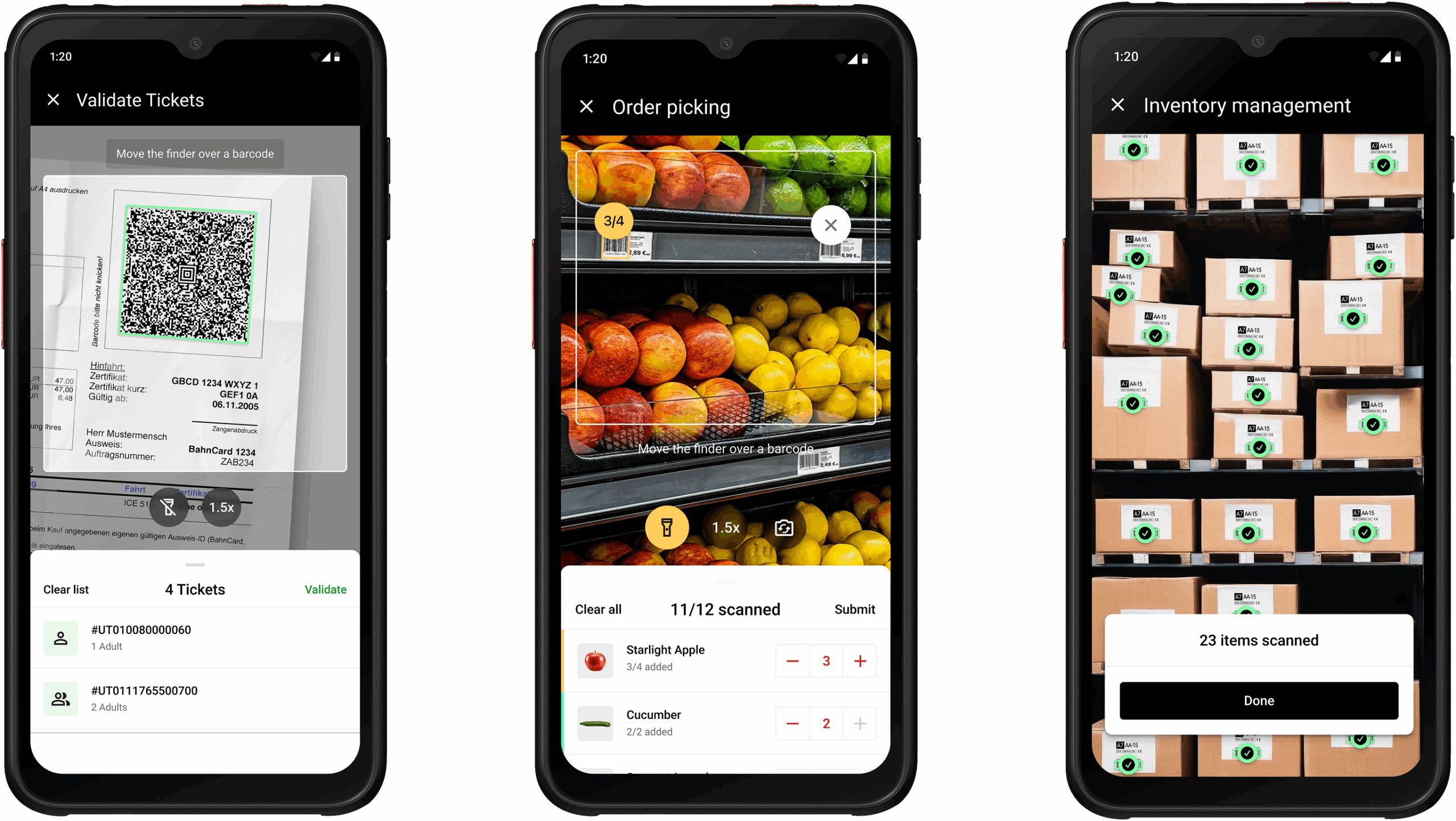
The Scanbot Barcode Scanner SDK delivers reliable scanning of IUID Data Matrix codes within mobile and web applications. It supports the ECC 200 Data Matrix symbols specified in MIL-STD-130N, whether they are applied as print labels or as DPM barcodes.
Its key advantages are:
- Designed for challenging conditions: The core machine learning model is trained on large datasets of blurry, damaged, and poorly printed barcodes, including DPM codes.
- Quick setup and customization: Ready-to-use UI components enable straightforward integration and fast rollout. At the same time, extensive customization options let you match it to your app’s design.
- 100% offline scanning: All data processing happens locally on the user’s device. This ensures uninterrupted workflows without network connectivity.
- Flat pricing for unlimited scanning: Our pricing is based on the number of apps or domains, not usage. Scan as many barcodes on as many devices as you need without additional cost.
Start testing today
Experience the Scanbot Barcode Scanner SDK’s performance for yourself by trying our free barcode scanner demo apps. You can also integrate the Scanbot SDK into your app with a free trial license and test it without restrictions for seven days.
If you want to build your own barcode scanning app in just a few minutes, you can do so thanks to the Web Barcode Scanner SDK and its Ready-to-Use UI Components.
First, create an index.html with some boilerplate code.
<!DOCTYPE html>
<html lang="en">
    <head>
        <meta charset="UTF-8" />
        <meta
            name="viewport"
            content="width=device-width, initial-scale=1.0, maximum-scale=1.0, user-scalable=0"
        />
        <title>Web Barcode Scanner</title>
    </head>
    <body>
    </body>
</html>
To set up your barcode scanner, do the following:
- Create a button that calls up the scanning interface when clicked.
- Include a
<p>element on the page for displaying the scanning result. - Import the Scanbot Web SDK using a CDN.
- Process the scan result before displaying it on the page.
The result will look something like this:
<!DOCTYPE html>
<html lang="en">
    <head>
        <meta charset="UTF-8" />
        <meta
            name="viewport"
            content="width=device-width, initial-scale=1.0, maximum-scale=1.0, user-scalable=0"
        />
        <title>Web Barcode Scanner</title>
    </head>

    <body style="margin: 0">
        <button id="start-scanning">Start scanning</button>
        <p id="result"></p>
        <script type="module">
            import "https://cdn.jsdelivr.net/npm/scanbot-web-sdk@7.0.0/bundle/ScanbotSDK.ui2.min.js";
            const sdk = await ScanbotSDK.initialize({
                enginePath:
                    "https://cdn.jsdelivr.net/npm/scanbot-web-sdk@7.0.0/bundle/bin/barcode-scanner/",
            });
            document
                .getElementById("start-scanning")
                .addEventListener("click", async () => {

                    const config =
                        new ScanbotSDK.UI.Config.BarcodeScannerScreenConfiguration();

                    const scanResult = await ScanbotSDK.UI.createBarcodeScanner(config);
                    if (scanResult?.items?.length > 0) {
                        document.getElementById("result").innerText =
                            `Barcode type: ${scanResult.items[0].barcode.format} \n` +
                            `Barcode content: "${scanResult.items[0].barcode.text}" \n`;
                    } else {
                        document.getElementById("result").innerText = "Scanning aborted by the user";
                    }
                });
        </script>
    </body>
</html>
You can then simply open the file in your browser or serve it via localhost to get started scanning barcodes.
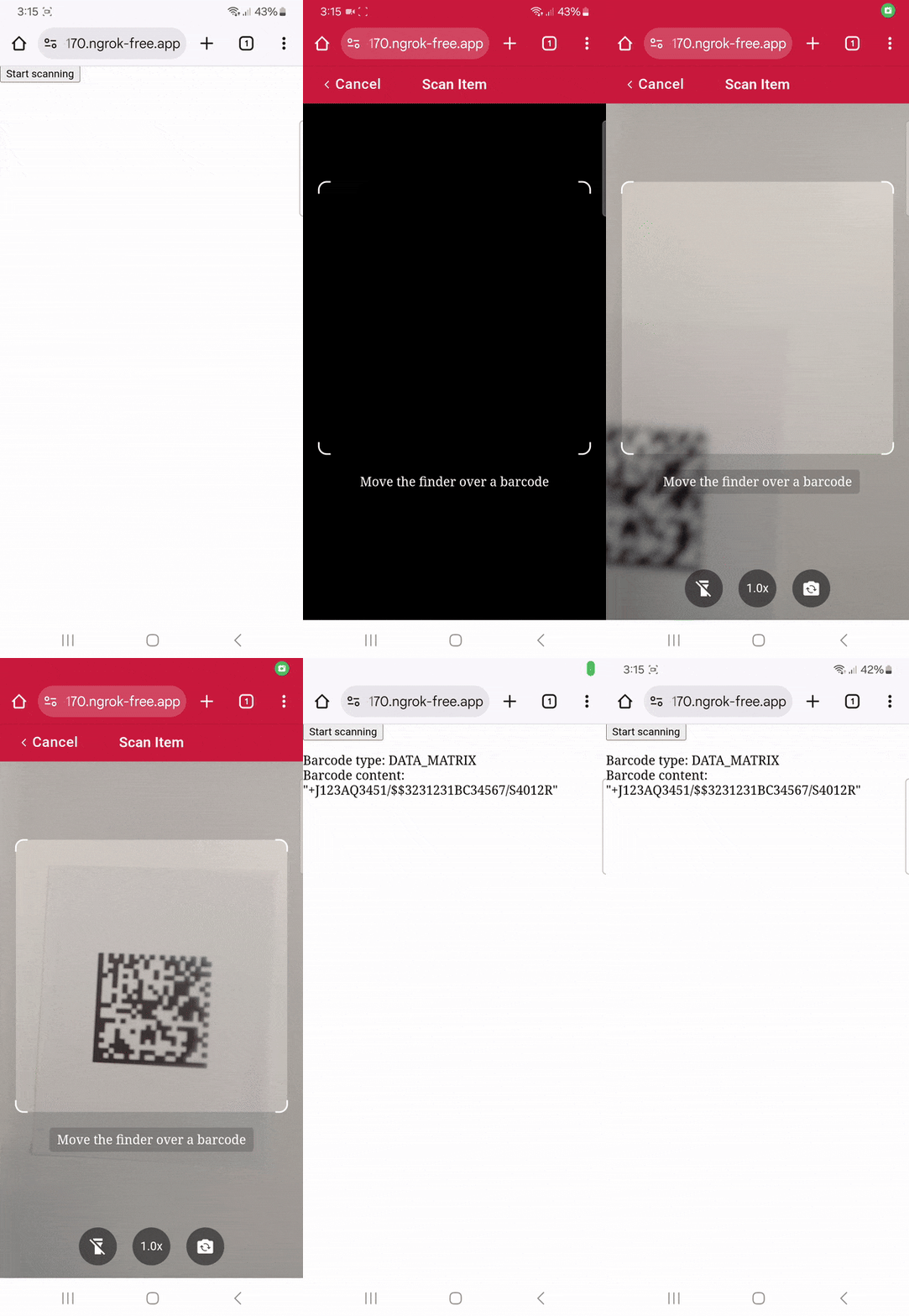
To learn more about how to customize the barcode scanner, head over to the documentation.
Happy scanning! 🤳
FAQ
When is MIL-STD-130N marking required?
MIL-STD-130N marking for item identification can be required by DoD contracts or policy. In practice, this is most commonly triggered by a DFARS 252.211-7003 clause, which flows IUID marking requirements into purchase contracts.
Items that typically require marking include DoD-designated items, serially managed items (regardless of value), and items with a unit acquisition cost of $5,000 or more.
What is the difference between UII and IUID?
IUID is the system for marking and registering items within the DoD, ensuring each item is uniquely identified. UII is the unique identifier produced by this system – a code used to distinguish an item from all others. In short, IUID is the process, and UII is the unique identifier generated through that process.
Can the Scanbot SDK scan Data Matrix codes created in accordance with MIL-STD-130N?
Yes. The Scanbot Barcode Scanner SDK supports ECC200 Data Matrix codes. Additionally, it is optimized for challenging conditions such as damaged, dirty, and poorly printed codes.
What is a CAGE code?
A CAGE code (Commercial and Government Entity code) is a unique identifier assigned to businesses and organizations by the U.S. Department of Defense (DoD). It is used to track contractors and suppliers in federal systems for procurement and logistics purposes.
What is a DUNS number?
A DUNS number (Data Universal Numbering System) is a unique nine-digit identifier assigned to businesses by Dun & Bradstreet (D&B). It is used globally to identify business entities and track them for credit, financial, and operational purposes.


