Standardized labeling keeps manufacturing and logistics operations fast, accurate, and aligned. The automotive industry has adopted AIAG labels for this purpose.
In this post, you’ll learn what AIAG labeling is, why it matters, and how it helps ensure compliance and parts traceability. We’ll also outline the AIAG B-10 guideline, share key best practices, and highlight how modern barcode scanning solutions keep operations efficient and compliant.
💡 Definition: What is AIAG?
The Automotive Industry Action Group (AIAG) is an industry association in which global automotive manufacturers, suppliers, and service providers collaborate to establish common standards, best practices, and guidelines. It was founded in 1982 by North America’s “Big Three” automakers – Ford, General Motors, and Chrysler. AIAG’s mission is to help organizations strengthen supply chain visibility, traceability, and compliance.
💡 Definition: What are AIAG labels?
AIAG labels are standardized labels for shipping and part identification used throughout the automotive supply chain. Their formatting is strictly defined by AIAG to ensure efficient communication between suppliers and Original Equipment Manufacturers (OEMs). With their uniform layout and machine-readable barcodes, AIAG labels enable fast and accurate scanning, minimize errors, and ensure compliance with OEM and industry requirements.
AIAG labels, standards, and manuals have also become key references for industries such as aerospace and for the U.S. Department of Defense.
✅ Benefits of AIAG labels
AIAG labels are more than just stickers – they provide standardized identification that ensures visibility and traceability across the automotive supply chain. Their benefits include:
- Reducing shipping and receiving errors: Standardized layouts and consistent placement of information significantly reduce human error during handling. Barcodes further minimize mistakes by allowing automated scanning instead of manual data entry.
- Speeding up processing: Manual data entry is not only error-prone, it is also slow. With machine-readable barcodes, data can be captured rapidly, accelerating processes and enabling real-time updates.
- Seamless integration with ERP and WMS systems: The standardized data structure acts as a common language across enterprise systems. This allows scanned label data to feed directly into ERP (Enterprise Resource Planning) systems and WMS (Warehouse Management Systems) for automated inventory updates and electronic data interchange (EDI).
- Ensuring compliance and avoiding penalties: Many automotive OEMs require adherence to AIAG labeling standards. Compliant labels are processed immediately, while non-compliant or unreadable labels can result in shipment rejections, chargebacks, and delays on the assembly line.
These advantages make AIAG labels an essential tool for supply chain operations in the automotive industry. Next, we’ll look at how this takes shape in the structure of AIAG labels, defined in the B-10 Guideline.
📄 B10 Trading Partner Labels Implementation Guideline
The B-10 Trading Partner Labels Implementation Guideline defines the layout and structure requirements for AIAG shipping labels. Its primary purpose is to establish a consistent, machine-readable label format. Its aim is to enable reliable data exchange between suppliers, carriers, and OEMs throughout the automotive supply chain.
While B-10 specifies how a label must be formatted, it does not mandate which specific data fields (e.g., part number, quantity, supplier ID, serial number) must appear. Those are determined by agreements between customers and suppliers.
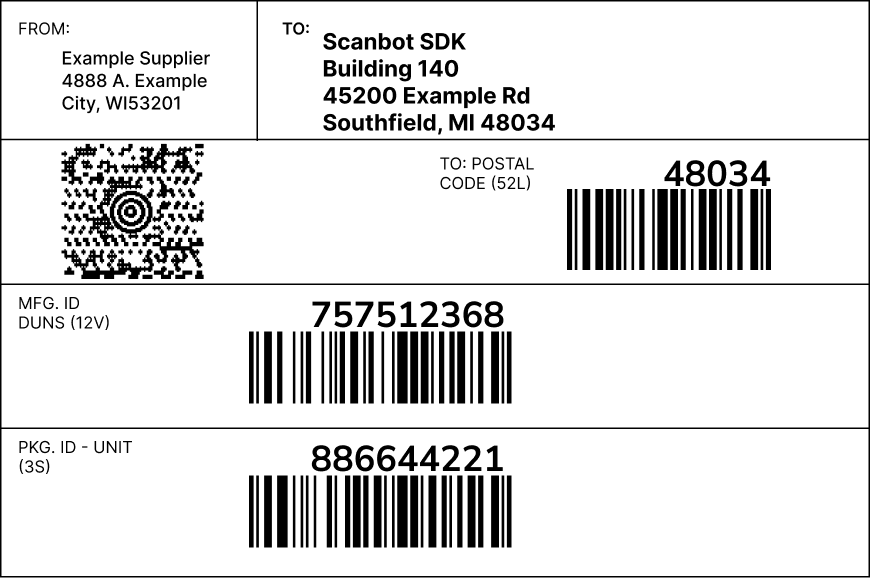
The current B-10 guideline, officially titled “Trading Partner Labels Implementation Guidelines Using Linear and 2D Symbologies,” consolidates what were previously three separate standards: B-10, B-12, and B-14.
This unified document addresses the full scope of label design, printing specifications, and data population requirements needed for modern shipping operations.
Label structure
The B-10 guideline defines a modular layout consisting of segments, building blocks, and rules for text formatting.
Segments
B-10 defines a vertical layout with three segments: CARRIER (top), CUSTOMER (middle), and SUPPLIER (bottom). Each segment groups information relevant to its respective stakeholder or “owner”. The segment owner is responsible for the data content and layout within their section.
Building blocks
The label is constructed from building blocks – the basic structural unit in B-10. A regular block has a standardized height of 1.0 inch ± 0.2 inch (25 mm ± 5 mm) and can contain text, graphics, linear barcodes, 2D symbols, or combinations thereof. Double-height blocks can be used for barcodes.
Blocks stack vertically with horizontal separators, and each block can be horizontally divided into up to four sub-blocks spanning its full height.
Text formatting
Text sizing uses a Lines Per Block (LPB) system with eight defined sizes to ensure consistent legibility. All labels must use black print on white background. The guideline also specifies that Ship-From text must be noticeably smaller than Ship-To text to aid carrier identification of destinations.
Linear barcode requirements
B-10 permits two 1D barcode symbologies:
- Code 39 (ISO/IEC 16388); must not include check digits
- Code 128 (ISO/IEC 15417); requires a check digit that is excluded from human-readable interpretation
All linear barcodes must include a Data Identifier (DI) per the ANSI MH10.8.2 standard – for example, “P” for Part Number or “Q” for Quantity. The DI appears in parentheses near the label title but is not part of the scannable data. Print quality must meet ISO/IEC 15416 Grade C (2.0) minimum.
Two-dimensional barcode requirements
B-10 incorporates the former B-14 standard for 2D symbology, specifying use cases and technical requirements. 2D barcodes are used because they provide far more data capacity than linear barcodes.
B-10 permits two 2D barcode symbologies and lays out some restrictions:
- PDF417 is to be used for shipping and receiving applications. Truncated and Macro variants are not permitted. Implementations must use error correction levels 3, 4, or 5.
- MaxiCode is designated for carrier sortation and tracking uses. It’s non-scalable and must be printed at exactly 0.035 inch (0.89 mm) per module, producing a symbol approximately 1 inch square.
2D symbols must implement a strict internal data structure to support electronic data exchange. Key requirements include:
- A two-level envelopes structure (Message Envelope containing Format Envelopes)
- A message header that starts with “[)>” and ends with the “RS” trailer character
- Use of Format 06, in which every data element is preceded by its DI and followed by the Group Separator (“GS”) character
- Support for multiple instances of the same DI via Nesting or Looping as defined in ANSI MH10.8.2
Data requirements
While B-10 focuses primarily on formatting specifications, it emphasizes the importance of unique container identification. The guideline strongly recommends using a Unique Container Identifier (often called a “license plate”), which must not be reused for the same customer within 366 days to maintain traceability.
Together, these rules ensure that AIAG labels provide consistent identification, strong traceability, and dependable data exchange throughout the supply chain.
📌 Best practices for creating AIAG labels
Beyond the B-10 formatting rules, effective AIAG labeling also depends on practical design choices, template maintenance, and on-site testing.
- Ensure barcodes meet specifications
In the table below, we have listed the key AIAG specifications for each barcode type.
| Barcode type | Code 39 / Code 128 | PDF417 | MaxiCode |
| Size / Height | 0.5 in (13 mm) minimum | Variable | Approx. 1 in × 1 in |
| X-Dimension | Within the range of 0.010 in (0.25 mm) to 0.017 in (0.43 mm) | Within the range of 0.010 in (0.25 mm) to 0.017 in (0.43 mm) | Fixed: 0.035 in (0.89 mm) |
| Quiet zone | Minimum: 10 × X-dimension or 0.25 in (6.4 mm) | 0.04 in (1 mm) on all sides | 0.04 in (1 mm) on all sides |
| Error correction | N/A | Mandatory: Level 3, 4, or 5 | Mode 2 or 3 recommended |
| Other specifications | Code 128 uses a mandatory check digit; Code 39 must not | Max 12 data columns (18 if trading partners agree) | The symbol is fixed in size and structure |
- Keep digital label templates updated for each OEM’s requirements
While the AIAG provides the core labelling framework, it is crucial to understand that OEMs often impose their own specific, non-standard requirements and additions on top of the base AIAG rules. Therefore, it’s recommended that trading partners proactively monitor OEMs’ supplier portals and conduct regular template audits.
- Test labels and scanning in real-life environments
Adherence to AIAG specifications in the label design phase is only half the battle. The final, crucial step is to test the labels and your scanning hardware in the exact conditions they will face in the supply chain. Simulate real-world conditions and evaluate different scanning solutions in low light, at angles, on reflective surfaces, with damaged, dirty, or poorly printed codes.
While traditional laser scanners have long been the standard for industrial applications, modern mobile solutions are increasingly popular. This is due to the growing use of 2D barcodes, which can encode more information than 1D codes, and the availability of rugged mobile devices. The latter combine the flexibility of a smartphone with industrial durability.
🤳🏻 Scanning barcodes on AIAG labels with the Scanbot SDK
The Scanbot Barcode Scanner SDK is high-performance scanning software that integrates seamlessly into your mobile app or website.
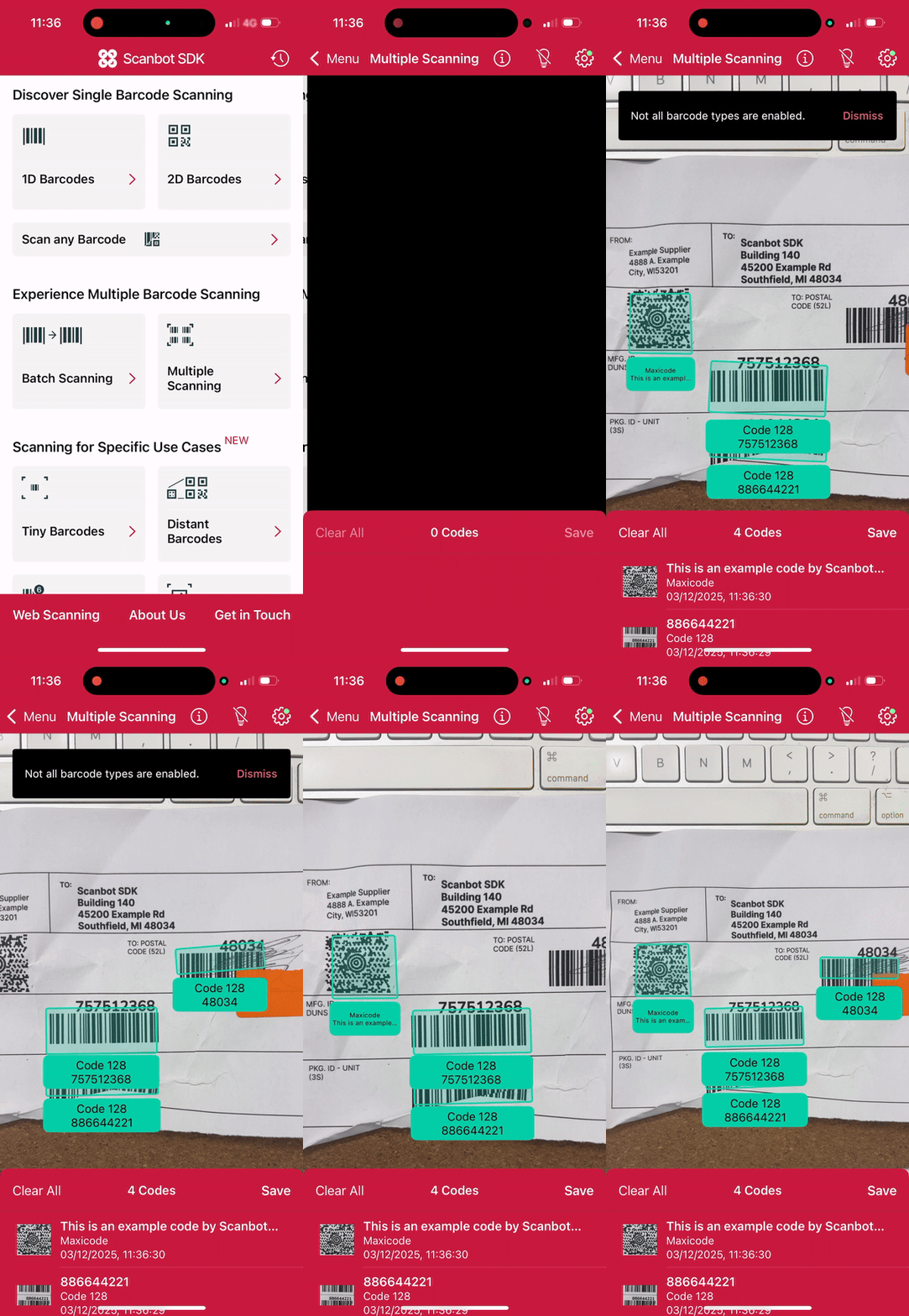
Our multi scanning mode captures multiple barcodes simultaneously. You can scan the entire AIAG label at once and extract all barcode data instantly, rather than scanning each code individually. Additional advantages include:
- Designed for challenging conditions: Our machine learning model is trained on extensive datasets of blurry, damaged, and poorly printed barcodes. This ensures reliable reads even from degraded AIAG labels.
- Quick setup and customization: Ready-to-use UI components enable straightforward integration and fast rollout, with extensive customization options to match your app’s design.
- 100% offline scanning: All data processing happens locally on the user’s device. This ensures uninterrupted workflows without network connectivity.
- Flat pricing for unlimited scanning: Our pricing is based on the number of apps or domains, not usage. Scan as many barcodes on as many devices as you need without additional cost.
Start testing today
Experience the Scanbot Barcode Scanner SDK’s performance for yourself by trying our free barcode scanner demo apps. You can also integrate the Scanbot SDK into your app with a free trial license and test it without restrictions for seven days.
If you want to build your own barcode scanning app in just a few minutes, you can do so thanks to the Web Barcode Scanner SDK and its Ready-to-Use UI Components.
First, create an index.html with some boilerplate code.
<!DOCTYPE html>
<html lang="en">
    <head>
        <meta charset="UTF-8" />
        <meta
            name="viewport"
            content="width=device-width, initial-scale=1.0, maximum-scale=1.0, user-scalable=0"
        />
        <title>Web Barcode Scanner</title>
    </head>
    <body>
    </body>
</html>
To set up your barcode scanner, do the following:
- Create a button that calls up the scanning interface when clicked.
- Include a
<p>element on the page for displaying the scanning result. - Import the Scanbot Web SDK using a CDN.
- Process the scan result before displaying it on the page.
The result will look something like this:
<!DOCTYPE html>
<html lang="en">
    <head>
        <meta charset="UTF-8" />
        <meta
            name="viewport"
            content="width=device-width, initial-scale=1.0, maximum-scale=1.0, user-scalable=0"
        />
        <title>Web Barcode Scanner</title>
    </head>

    <body style="margin: 0">
        <button id="start-scanning">Start scanning</button>
        <p id="result"></p>
        <script type="module">
            import "https://cdn.jsdelivr.net/npm/scanbot-web-sdk@7.0.0/bundle/ScanbotSDK.ui2.min.js";
            const sdk = await ScanbotSDK.initialize({
                enginePath:
                    "https://cdn.jsdelivr.net/npm/scanbot-web-sdk@7.0.0/bundle/bin/barcode-scanner/",
            });
            document
                .getElementById("start-scanning")
                .addEventListener("click", async () => {

                    const config =
                        new ScanbotSDK.UI.Config.BarcodeScannerScreenConfiguration();

                    const scanResult = await ScanbotSDK.UI.createBarcodeScanner(config);
                    if (scanResult?.items?.length > 0) {
                        document.getElementById("result").innerText =
                            `Barcode type: ${scanResult.items[0].barcode.format} \n` +
                            `Barcode content: "${scanResult.items[0].barcode.text}" \n`;
                    } else {
                        document.getElementById("result").innerText = "Scanning aborted by the user";
                    }
                });
        </script>
    </body>
</html>
You can then simply open the file in your browser or serve it via localhost to get started scanning barcodes.
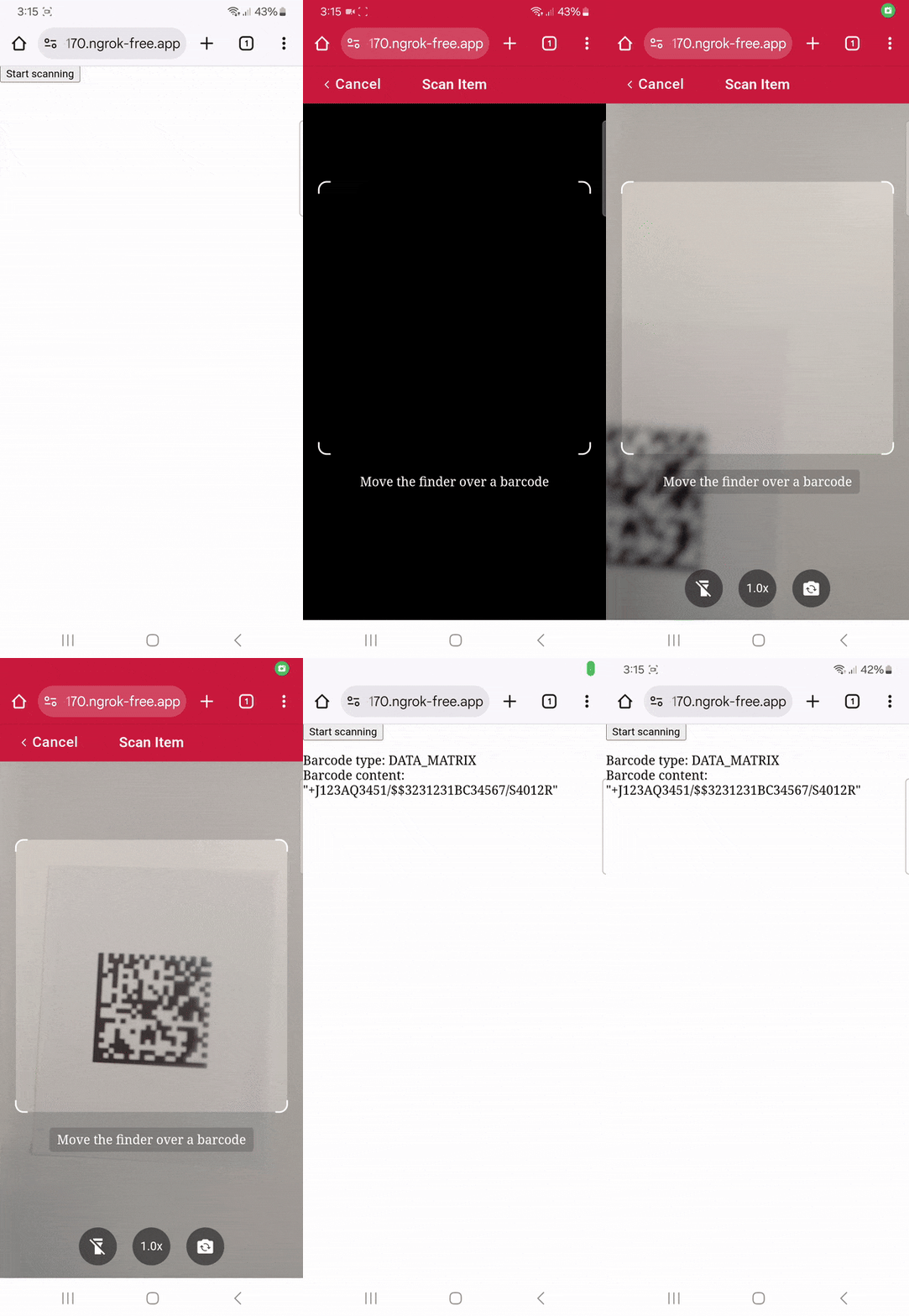
To learn more about how to customize the barcode scanner, head over to the documentation.
Happy scanning!
FAQ
What barcode types are allowed on AIAG labels?
AIAG labels allow four barcode types, each serving a specific purpose:
– Code 39 without check digits, for general data
– Code 128 with check digit, for general data
– PDF417, for shipping and receiving
– MaxiCode, primarily for carrier sortation and tracking
What should be the minimum height of linear barcodes on AIAG labels?
Code 39 and Code 128 symbols must have a minimum bar height of 0.5 inch (13 mm), and their narrowest element width must fall between 0.010 inch (0.25 mm) and 0.017 inch (0.43 mm).
Which data fields are mandatory on an AIAG label?
There are no mandatory fields. While the B-10 standard defines formatting, it doesn’t define what data is required on the label. OEM agreements define this.
How can I read barcodes on AIAG labels?
You can read the barcodes used on AIAG labels (Code 39, Code 128, PDF417, and MaxiCode) with most modern barcode scanners, including dedicated handheld devices and smartphone-based solutions. However, keep in mind that most laser scanners are designed for 1D barcodes and will not be able to capture PDF417 or MaxiCode, both of which are 2D symbologies.
Software solutions can be particularly effective. The Scanbot Barcode Scanner SDK enables enterprise-grade scanning directly within mobile apps and web applications. It supports a wide range of 1D, 2D, and specialized barcodes. The SDK is designed to handle real-world challenges such as damaged, low-contrast, reflective, or poorly printed labels.
Can I design AIAG labels in regular tools like Excel, Word, or Figma?
Yes, you can create basic label layouts in Excel, Word, or Figma, but these tools aren’t designed for producing compliant AIAG labels at scale.
For production environments, specialized document generation software offers significant advantages: automated label creation from templates and guaranteed consistency. Solutions like iText provide programmatic PDF generation, making it straightforward to produce high-quality, standards-compliant labels efficiently.