Barcodes on identification documents are critical for interoperability, security, and administrative efficiency across North American jurisdictions. In this article, we explore the barcode on your ID – and explain how to read it.
The authority behind the design
The American Association of Motor Vehicle Administrators (AAMVA) is a non-profit organization made up of the states’ Department of Motor Vehicles (DMVs) and equivalent offices in the US and Canada.
The AAMVA exists to help the states work together on driver licensing, vehicle registration, and road safety so that rules are consistent, and systems can communicate with one another.
The AAMVA standard
The AAMVA standard is a set of rules for the design, production and use of government-issued driver licenses (DL) and identification cards (IDs).
At its core is the “one driver, one license, and one driver control record” concept, which is essential for managing a mobile driving population. By ensuring each person has only one valid credential, the standard improves the reliability of identification and helps curb identity theft. Key to achieving this is its requirement for interoperable machine-readable technology (MRT), which allows jurisdictions to verify documents across borders.
Defining the “ID”
The standard covers both driver licenses and IDs because they are both used for identity verification, although there are some functional differences between these documents.
A driver license (DL) is primarily a document granting the legal privilege to operate a motor vehicle. However, it has also evolved into the “identity document of choice” for identification, age verification, and residence validation.
For individuals who do not drive, jurisdictions issue an identification card (ID). This document requires the same identity verification process as a DL but is strictly for identification purposes.
Beyond these standard documents, the enhanced driver license (EDL) serves as a specialized international travel document for US and Canadian citizens crossing land or sea borders under the Western Hemisphere Travel Initiative (WHTI). To this end, the EDL incorporates technologies not found on standard IDs, such as a machine-readable zone (MRZ) for electronic scanning.
The anatomy of IDs and DLs
After this overview of the different types of identity documents, let’s look at how they are constructed.
Zoned layout
The AAMVA standard specifies a consistent, zoned layout.
Previously, over 200 design variations made it hard for law enforcement to verify IDs. By dividing the card into specific zones, the standard ensures that, regardless of colors or artwork, the data is always in a predictable location for both humans and machines.
The front side: Zones I, II, and III
The front of the card – officially the portrait side – is designed for rapid visual identification and holds all primary human-readable data:
- Zone I: Located at the top of the card, this zone contains the issuing jurisdiction information (such as the state or province name and the “USA” or “CAN” country code) and the document type indicator (e.g., “Driver License” or “Identification Card”).
- Zone II: This area contains biographic information, including name, address, date of birth, sex, height, and eye color, as well as document-specific details like the issue and expiry dates. It is the most data-dense area.
- Zone III: This area is dedicated to the photo and signature.
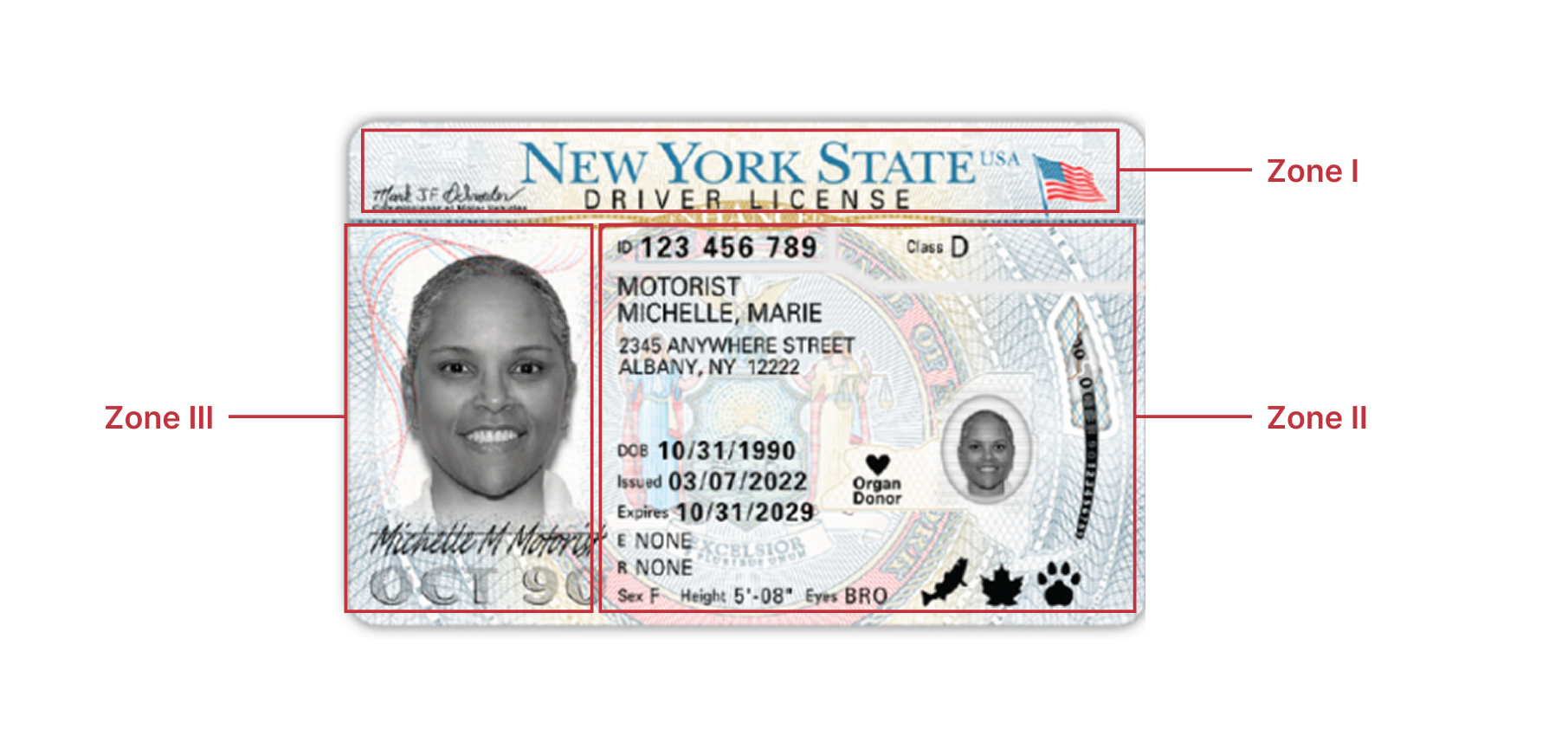
The portrait side of the card can be laid out horizontally or – for under 21-year-olds in the US – vertically.
The back side: Zones IV and V
The back of the card – or non-portrait side, officially – is identical across both horizontal and vertical card formats to assist in seamless scanning.
- Zone IV: This zone is used for explanations of codes and any overflow data from Zone II that could not fit on the front. It will also contain an MRZ if the document is an EDL.
- Zone V: This zone is reserved for the PDF417 2D barcode. While other optional technologies like magnetic stripes or smart chips can co-exist here, Zone V is specifically designed to be the “landing pad” for scanners.
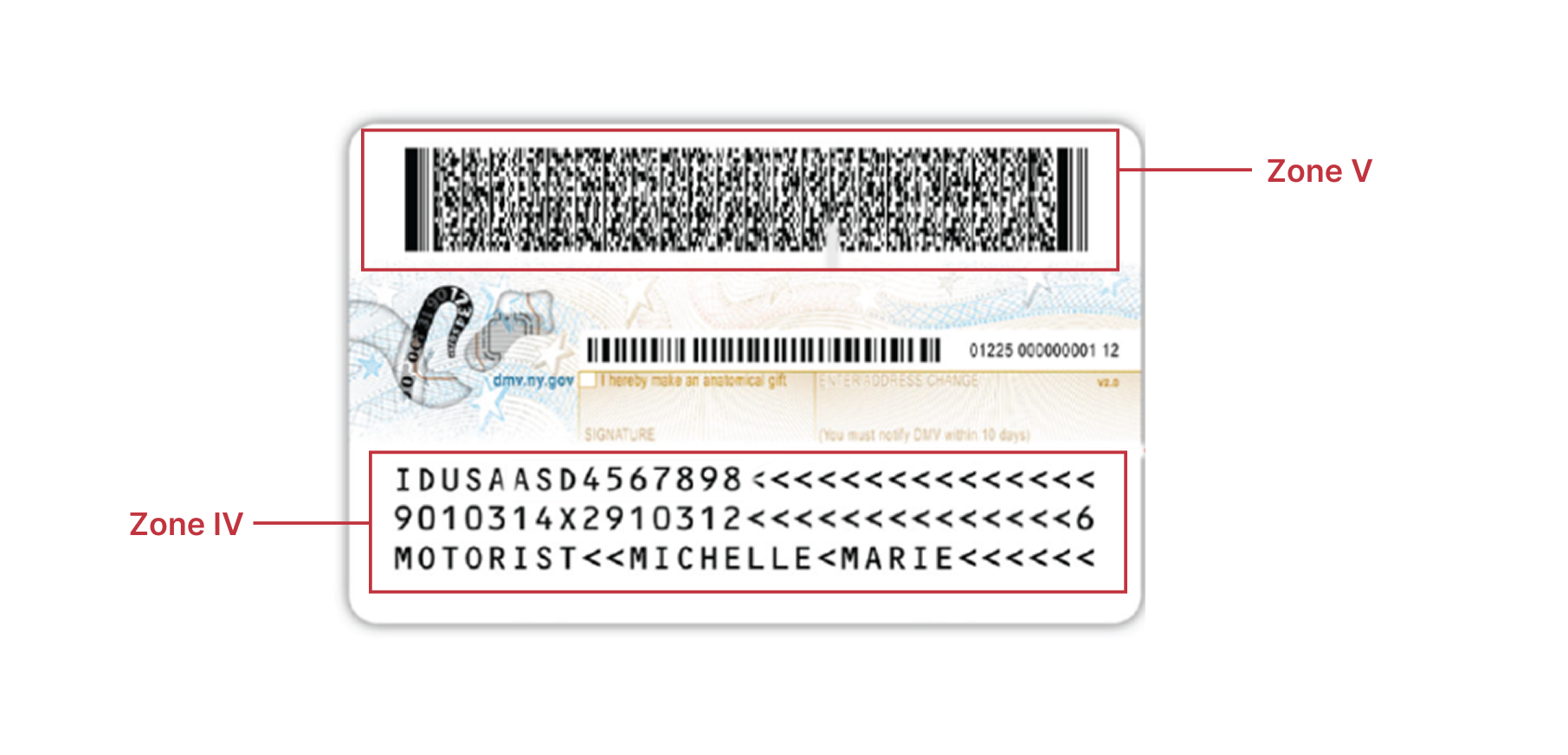
In the next section, we zoom in on the PDF417 code and what’s encoded in it.
The barcode symbology: PDF417
The PDF417 barcode is the minimum mandatory machine-readable technology (MRT) that must be present for a document to be considered compliant with the AAMVA standard. The barcode mirrors the data on the front of your ID.
The data encoded within the PDF417 barcode on a compliant ID is organized into a specific structure comprising a file header, subfile designators, and individual data elements.
The barcode’s content begins with a Fixed Header that includes a compliance indicator (“@”), data separators, the Issuer Identification Number (IIN), and the AAMVA version number.
This is followed by a Subfile Designator – labeled “DL” for driver licenses or “ID” for identification cards – which indicates the type of data that follows and its location within the barcode file. The subfile contains the actual personal and document data.
Individual data elements
The following table provides an overview of the key data elements typically found within the PDF417 barcode subfiles, categorized by their function. Each element is prefaced by a specific three-letter Element ID.
| Category | Element IDs | Encoded information | Requirement |
| Personal identity | DCS, DAC, DAD | Customer names: Family name, first name, and middle name(s) | Mandatory |
| Personal identity | DBB, DBC | Biographics: Date of birth and sex (1=male, 2=female, 9=other) | Mandatory |
| Personal identity | DAZ, DCI, DCU | Additional details: Hair color, place of birth, and name suffix (e.g., Jr., Sr.) | Optional |
| Physical traits | DAU, DAY | Visual identifiers: Height and eye color | Mandatory |
| Physical traits | DCE, DAW, DAX | Weight: Weight range or specific weight in pounds or kilograms | Optional |
| Document details | DAQ, DCF, DCG | Identifiers: Unique Customer ID number, Document Discriminator, and Country ID (USA/CAN) | Mandatory |
| Document details | DBD, DBA | Dates: Document issue date and expiration date | Mandatory |
| Document details | DDA, DDB, DDD | Compliance: REAL ID compliance type, card revision date, and limited duration stay indicator | Optional |
| Address | DAG, DAI, DAJ, DAK | Residence: Street address, city, jurisdiction code, and postal/ZIP code | Mandatory |
| Address | DAH | Secondary address: Second line for street portion (e.g., apartment number) | Optional |
| Driving privileges | DCA, DCB, DCD | Jurisdiction codes: Vehicle class, restriction codes, and endorsement codes | Mandatory for DL |
| Driving privileges | DDM, DDN, DDP | Status: CDL indicator, non-domiciled indicator, and permit indicator | Optional |
| Indicators | DDK, DDL | Status markers: Organ donor and veteran status indicators | Optional |
| Indicators | DDH, DDI, DDJ | Age thresholds: “Under 18,” “Under 19,” and “Under 21” until dates | Optional |
| Truncation | DDE, DDF, DDG | Data integrity: Codes indicating if the family, first, or middle names were truncated to fit | Mandatory |
Encoding rules
The data stored within the PDF417 barcode is governed by strict rules to ensure the code is a reliable digital “twin” of the physical card. These rules focus on establishing transparency for the cardholder and technical uniformity for scanning devices.
Harmonization principle
To ensure transparency, the AAMVA standard requires a direct correlation between human-readable text and machine-readable data. Jurisdictions are strongly discouraged from encoding information in the barcode that does not have a corresponding printed field on the card.
Regional data formatting
The format of the data elements is standardized to ensure interoperability across North America. The date format, specifically, follows the regional convention: the United States uses MMDDCCYY, while Canada uses CCYYMMDD.
Handling missing or unavailable data
To prevent scanning errors, the barcode must account for every mandatory field. If a mandatory data element is unavailable, the specific code “unavl” is encoded. If a mandatory field simply does not exist for a specific individual, the word “NONE” is used instead.
Jurisdiction-specific subfiles
While the standard mandates a common data set, it allows states and provinces the flexibility to include unique local information through jurisdiction-specific subfiles.
These subfiles are placed after the mandatory data and are easily identified by a designator beginning with the letter “Z” followed by the first letter of the jurisdiction’s name (e.g., “ZC” for California or “ZV” for Virginia). Individual data elements within these custom subfiles are similarly prefaced with codes like “ZVA” or “ZVB” to maintain an organized, alphabetic structure.
Unlike the main set of information, jurisdiction-specific subfiles can be encrypted.
Additional and prohibited barcodes
Besides the mandatory PDF417, linear barcodes may be included optionally. For example, an inventory control number may be printed as a barcode to track the card stock and laminate used during production.
While these barcodes are permitted, the use of certain variants of the PDF417 (Micro, Macro, and Compact) is strictly prohibited.
Scanning and extracting data from ID barcodes
Extracting data directly from the barcode enables faster, more accurate processing without the need for manual reading or data entry. While this approach drastically reduces errors and improves efficiency, there are some challenges to keep in mind.
Common challenges
Scanning ID barcodes involves overcoming several technical, physical, and environmental challenges:
- Worn, damaged barcodes: Over time, scratches, abrasions, and general wear can degrade the fine lines of the PDF417 symbol, making it difficult for scanners to decode the data.
- Barcode density: PDF417 can store a large amount of data. The resulting high data density is challenging for lower-end scanners. They may struggle to read and accurately decode the information.
- Lamination interference: While lamination protects the card, it can also become an obstacle to scanning. The lamination process itself can degrade the print quality, and the plastic surface can cause reflections that make scanning more difficult.
- Environmental stressors: Poor lighting and scanning angles introduce yet more challenges. Over time, exposure to sunlight can fade the barcode, reducing contrast and making it harder for scanners to read.
Fortunately, modern barcode scanners are designed to compensate for many of these issues. In the next section, we’ll go over what to consider when choosing a barcode scanner.
How to choose an ID barcode scanner
What the right scanner is depends on your needs. Yet overall, there are four key considerations that apply to any use case:
Reliability in real-world conditions
Firstly, your barcode scanner should be able to handle all the challenges described previously, from damaged and poorly printed codes to data-dense barcodes. Thorough testing in your specific environment is recommended to confirm that the scanner delivers consistent scanning performance.
Data security
All data in the PDF417 is unencrypted for ease of use by law enforcement. Therefore, an extra layer of data security is preferred to protect the personal data it contains. Check if your scanner complies with CCPA and GDPR privacy regulations. Ideally, it should process all data locally on the device, without connections to the cloud or third-party servers.
Offline functionality
In the field, network connectivity may be slow, unreliable, or completely unavailable. For such situations, it’s important to use scanners that can operate fully offline, even in remote areas without internet.
Parsing options
Most barcode readers provide the raw value without further processing. Parsing features extract key-value pairs from this data, making it easy to map specific information (like name, date of birth, or license number) directly into your systems.
Scanning the barcode on an ID without parsing the data would give you something like this:
DCSSMITH\nDACJOHN\nDBB06161986\nDBC1\nDAYBRO\n...
Parsing the data and applying formatting to the elements according to their types gives us the following results:
LastName: Smith
FirstName: John
DateOfBirth: 06.16.1986
Sex: Male
EyesColor: Brown
While barcode scanning workflows have traditionally relied on bulky hardware devices, modern software solutions that use a mobile device camera have become increasingly popular. One such solution provider is Scanbot SDK.
Scanbot SDK: Reliable and fast ID barcode scanning
The Scanbot US Driver’s License Scanner SDK quickly and reliably extracts personal information from PDF417 codes on IDs and DLs, right in your mobile or web app. It includes a parser that transforms the data into key-value pairs to facilitate smooth backend processing.
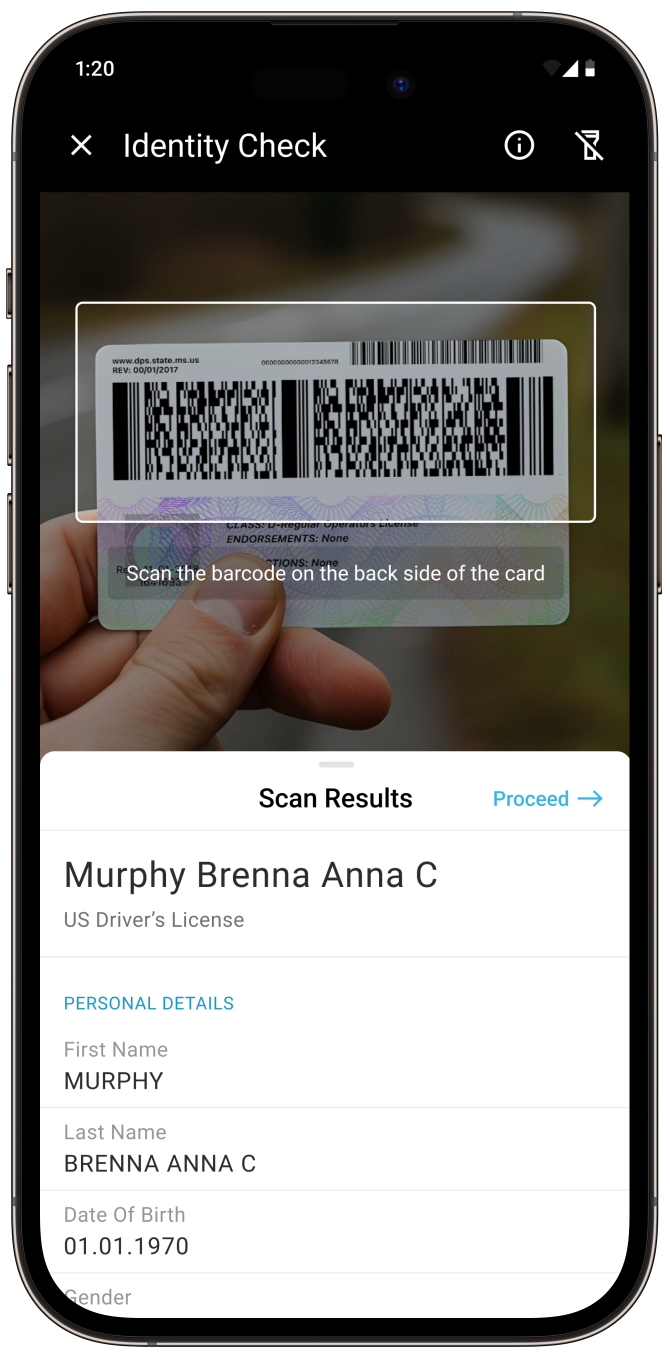
Our decoding algorithm is trained on large data sets and optimized to perform reliably even under challenging conditions. The scanner operates fully offline, with all data processed locally on the device to ensure compliance with CCPA and GDPR regulations.
It is intuitive to use, offering features such as user guidance and AR overlays.
Start testing today
With the Scanbot SDK’s ready-to-use UI components, you can set up a fully functional driver’s license scanner app with just a few lines of code – even in a single, self-contained HTML file, thanks to the Scanbot Web Barcode Scanner SDK. Take a look:
<!DOCTYPE html>
<html lang="en">

<head>
    <meta charset="UTF-8" />
    <meta name="viewport" content="width=device-width, initial-scale=1.0, maximum-scale=1.0, user-scalable=0" />
    <title>AAMVA Barcode Parser</title>
</head>

<body style="margin: 0">
    <button id="start-scanning">Start scanning</button>
    <p id="result"></p>
    <script type="module">
        import "https://cdn.jsdelivr.net/npm/scanbot-web-sdk@7.0.0/bundle/ScanbotSDK.ui2.min.js";

        const resultBox = document.getElementById("result");

        const wasm_path = "https://cdn.jsdelivr.net/npm/scanbot-web-sdk@7.0.0/bundle/bin";
        const sdk = await ScanbotSDK.initialize({ enginePath: `${wasm_path}/barcode-scanner/` });

        document.getElementById("start-scanning").onclick = async () => {
            const config = new ScanbotSDK.UI.Config.BarcodeScannerScreenConfiguration();
            config.scannerConfiguration.barcodeFormats = ["PDF_417"];
            config.viewFinder.aspectRatio.height = 1;
            config.viewFinder.aspectRatio.width = 3;

            const scanResult = await ScanbotSDK.UI.createBarcodeScanner(config);
            if (scanResult?.items === undefined || scanResult.items.length == 0) {
                resultBox.innerText = "Scanning aborted by the user";
                return;
            }

            const barcode = scanResult?.items[0].barcode;
            const extractedDocument = barcode.extractedDocument;

            const extractDocumentFields = (document) => {
                const fields = [];

                const processFields = (input) => {
                    if (!Array.isArray(input))
                        return;

                    input.forEach((field) => {
                        if (field.type?.name && field.value?.text) {
                            fields.push(field);
                        }
                    });
                };

                processFields(document.fields);

                if (Array.isArray(document.children)) {
                    document.children.forEach((child) => {
                        processFields(child.fields);
                    });
                }

                return fields;
            }

            const documentResult = extractDocumentFields(extractedDocument);
            resultBox.innerText = documentResult.map((field) => `${field.type.name}: ${field.value.text}`).join("\n");
        };
    </script>
</body>

</html>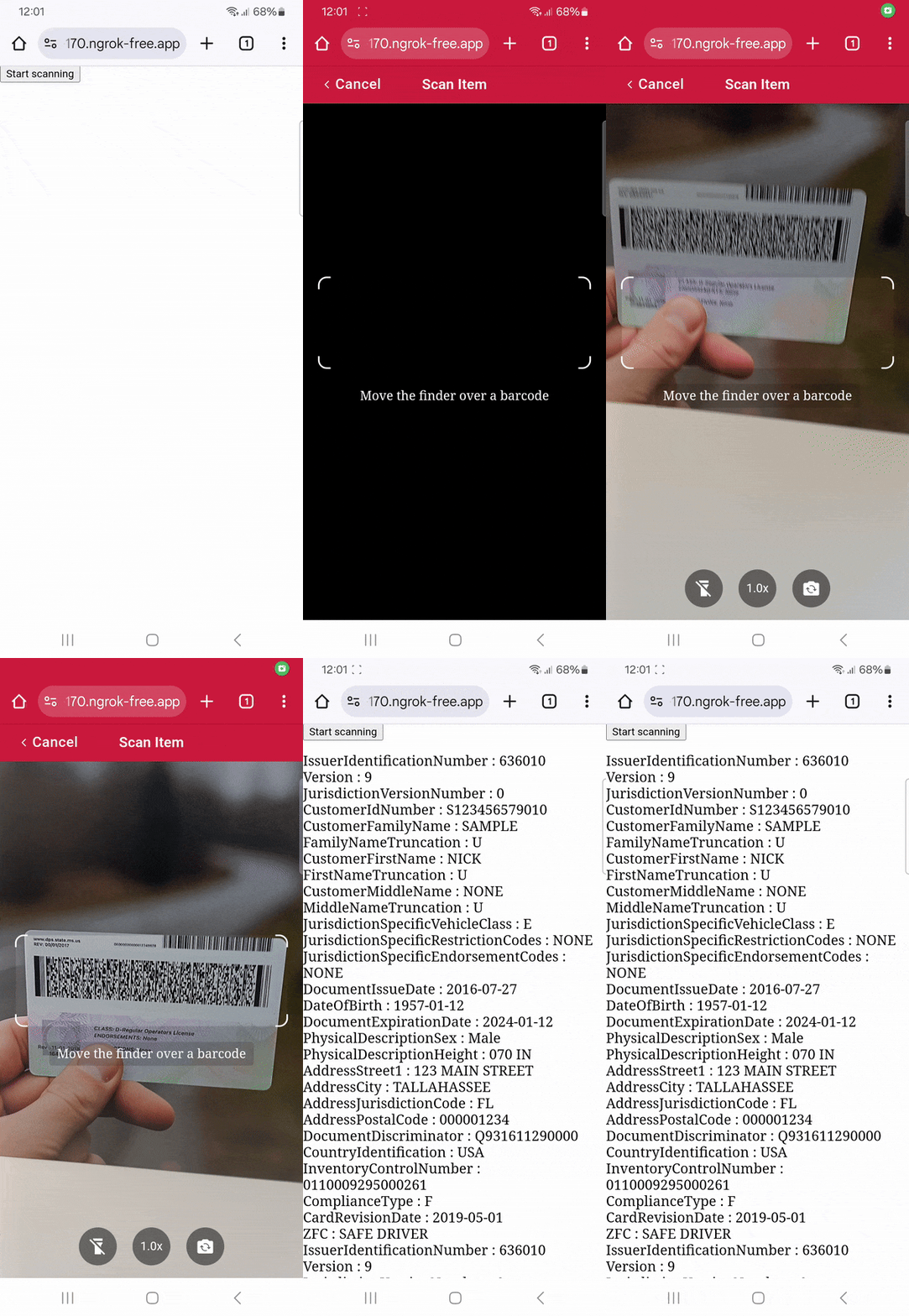
Feel free to copy the code into an HTML file and run it in your browser. When moving to production, we recommend you download the SDK and host it on your server instead of using a CDN.
Happy scanning! 🤳
FAQ
What error correction level is required for ID barcodes?
The standard requires a minimum error correction level of 3 to ensure the PDF417 code can still be read if it becomes scratched or worn. Where space allows, level 5 correction is recommended for even greater reliability.
What is the document discriminator?
The document discriminator is a mandatory alphanumeric identifier, up to 25 characters in length, that must uniquely identify a specific issued credential from all others previously issued to that customer. Defined by the AAMVA standard for use on driver’s licenses and identification cards across the United States and Canada, this element is encoded in the PDF417 barcode under the element identifier “DCF”.
Can ID barcodes be scanned from a photo or screenshot instead of the physical card?
Yes. With the Scanbot US Driver’s License Scanner SDK, PDF417 barcodes can be reliably read from photos or screenshots. The physical card isn’t required as long as the barcode image is clear and in reasonably good condition.
Are ID barcodes the same across all US states and Canadian provinces?
While the structure and mandatory elements are standardized under the same AAMVA specification, jurisdictions may include optional fields and custom subfiles. As a result, the core data is consistent, but some elements may vary by issuing authority.