Web app development is gaining popularity, and for good reason. With web applications, businesses can offer users a uniform experience regardless of device.
In a previous post, we looked at five popular barcode scanning libraries for the web. Building on that overview, we’re now taking a closer look at two of the most used options: Quagga2 and html5-qrcode.
💡 Key findings
- Quagga2 supports Chrome, Firefox, Safari, Edge, and Opera
- html5-qrcode supports the same on most platforms, with exceptions on iOS
- Quagga2 only scans 1D barcodes
- html5-qrcode scans 1D and 2D barcodes, including GS1 DataBar (Expanded)
Both libraries offer scanning from a live camera stream and from image files. However, neither supports scanning multiple barcodes at once.
- Quagga2 has known limitations in torch and zoom features
- html5-qrcode has no such issues
- Quagga2 provides basic components, but developers must build the UI themselves
- html5-qrcode offers both low-level components and a pre-built scanner UI
- Quagga2 is being updated regularly
- html5-qrcode development is inactive, with the latest release dating from April 2023
- Quagga2 shows steady activity with many community contributions
- html5-qrcode’s community is active as well, but has significantly less contributions
- Quagga2 is easy to set up, but requires more manual work
- html5-qrcode has a ready-made UI that can be integrated with a few lines of code
- Quagga2 provides documentation including quick starts and tutorials, and a demo
- html5-qrcode offers documentation and a demo as well
- Quagga2
- No support for 2D barcodes
- Issues with small, damaged, or poorly printed barcodes
- False positives with EAN codes
- Camera error on Samsung devices
- html5-qrcode
- Issues with camera permissions
- Inconsistent behavior across devices and environments
- Issues with inverted and low-contrast barcodes
- Issue scanning from live camera stream
Comparison: Quagga2 vs. html5-qrcode
Quagga2 is the maintained fork of the original QuaggaJS project. The JavaScript-only library is designed to scan 1D barcodes.
html5-qrcode is a community-maintained fork of ZXing, built on ZXing-js specifically. It is a HTML- and JavaScript-based web library that scans 1D and 2D barcodes. Wherever available, the library uses the native BarcodeDetector API. Unlike Quagga2, it offers a full UI.
Supported browsers
Quagga2 supports Google Chrome, Mozilla Firefox, Safari, Opera, and Microsoft Edge.
html5-qrcode supports the same browsers, but differentiates depending on the framework (desktop, Android or iOS) in its documentation.
| Browser | Quagga2 | html5-qrcode PC/Mac | html5-qrcode Android | html5-qrcode iOS |
| Chrome | ✅ Yes | ✅ Yes | ✅ Yes | ✅ Yes |
| Firefox | ✅ Yes | ✅ Yes | ✅ Yes | ✅ Yes |
| Safari | ✅ Yes | ✅ Yes | N/A | ✅ Yes |
| Edge | ✅ Yes | ✅ Yes | ✅ Yes | ⚠️ Limited |
| Opera | ✅ Yes | ✅ Yes | ✅ Yes | ❌ No |
| Opera Mini | ❌ No | ❌ No | ✅ Yes | ❌ No |
| UC | ✅ Yes | ❌ No | ️ ⚠️ Limited | ❌ No |
⚠️ Partial support – only file-based scanning, camera input in progress
Supported barcode types
Quagga2 supports only 1D barcode formats.
html5-qrcode offers broader coverage. It supports the most common 1D and 2D symbologies as well as GS1 DataBar and GS1 DataBar Expanded barcodes.
Neither library covers more specialized formats, such as Micro QR Code, MicroPDF417, or postal barcode symbologies. Both libraries do allow restricting which formats will be scanned.
| Barcode types | Quagga2 | html5-qrcode |
| UPC-A | ✅ Yes | ✅ Yes |
| UPC-E | ❌ No | ✅ Yes |
| UPC-A/EAN Extension | ✅ Yes Requires manual setup | ✅ Yes |
| EAN-8 | ✅ Yes | ✅ Yes |
| EAN-13 | ✅ Yes | ✅ Yes |
| ITF (Interleaved 2 of 5) | ✅ Yes | ✅ Yes |
| Code 39 | ✅ Yes | ✅ Yes |
| Code 93 | ✅ Yes | ✅ Yes |
| Code 128 | ✅ Yes | ✅ Yes |
| Codabar | ✅ Yes | ✅ Yes |
| MSI Plessey | ❌ No | ❌ No |
| Intelligent Mail barcode (IMb) | ❌ No | ❌ No |
| GS1 DataBar | ❌ No | ✅ Yes |
| GS1 DataBar Expanded | ❌ No | ✅ Yes |
| GS1 DataBar Limited | ❌ No | ❌ No |
| QR Code | ❌ No | ✅ Yes |
| Micro QR Code | ❌ No | ❌ No |
| Data Matrix | ❌ No | ✅ Yes |
| Aztec | ❌ No | ✅ Yes |
| PDF417 | ❌ No | ✅ Yes |
| MicroPDF417 | ❌ No | ❌ No |
| MaxiCode | ❌ No | ✅ Yes |
| Pharmacode | ❌ No | ❌ No |
Capabilities
Both libraries support scanning barcodes from a live camera stream as well as from image files.
However, a notable limitation is that both Quagga2 and html5-qrcode return only a single barcode per scan. If multiple barcodes are visible in the frame, the scanner will recognize the one it detects first.
While Quagga2 supports zoom, the feature has its quirks. Users flag that zoom constraints passed inside Quagga.init() are ignored, but applying them after initialization does work. This creates an unwanted “jump” effect: the camera starts un-zoomed, then snaps to zoom once applyConstraints() runs.
html5-qrcode provides working torch and zoom controls.
Both libraries let you define a region of interest (ROI).
| Feature | Quagga2 | html5-qrcode |
| Barcode type configuration | ✅ Yes | ✅ Yes |
| Scan multiple codes at once | ❌ No | ❌ No |
| Scan from images | ✅ Yes | ✅ Yes |
| Omnidirectional scanning | ✅ Yes | ✅ Yes |
| Camera switching | ✅ Yes | ✅ Yes |
| Torch toggle | ⚠️ Limited Not on iOS <16.4, and may or may not work on later versions | ✅ Yes |
| Zoom control | ⚠️ Limited Browser-dependent, and must be applied after initialization | ✅ Yes |
| Define ROI | ✅ Yes | ✅ Yes |
Customizability
As both libraries are open source, there is high flexibility when it comes to customizing behavior or user interface. However, be aware that you will have to do a lot of the setup yourself.
While Quagga2 provides basic UI elements like a bounding box and a scan area overlay, developers still must put together a functional UI themselves.
html5-qrcode offers both a high-level library with a pre-built UI (Html5QrcodeScanner) and a low-level library to build your own UI with (Html5Qrcode).
Maintenance and updates
Quagga2 is regularly updated by its maintainers. While fixes are shipped on a regular basis, dozens of GitHub issues remain open. Therefore, developers may have to fix issues on their own.
html5-qrcode‘s development and maintenance have stalled, with no releases since April 2023. The project’s GitHub page clearly states that it is in maintenance mode, with the author no longer merging pull requests or developing new features. This makes long-term dependability uncertain.
Community and support
Both libraries have active user communities and a significant number of forks.
Quagga2’s repository shows steady activity, with contributors responding to issues and reviewing pull requests on a regular basis. There is no official support, but developers commonly seek help through Reddit and Stack Overflow.
html5-qrcode also receives a consistent stream of new issue reports, but responses are sparse. Currently, the library is effectively unmaintained.
Both libraries have dedicated tags on Stack Overflow: quaggajs and html5-qrcode.
Ease of integration
Both libraries are relatively straightforward to set up.
However, Quagga2 does not include UI components, so developers need to implement their own interface. This necessitates additional effort and customization.
html5-qrcode is generally the quicker option for getting a scanner running with minimal setup. Its Html5QrcodeScanner class provides ready-made UI elements and handles camera permissions automatically, allowing a functional scanner to be implemented in fewer than ten lines of code.
Developer resources
Both libraries provide documentation and offer demos to test the functionalities upfront.
After a user complained about the quality of Quagga2 documentation, it is now being updated. While it is still under construction, the maintainer has already added a quick start guide. The planned structure includes tutorials and API references.
html5-qrcode provides dedicated documentation as well.
| Quagga2 | html5-qrcode |
| GitHub repository Documentation Integration tutorial Demo app | GitHub repository Documentation Integration tutorial Demo app |
Cost and license
Both libraries are open source and free. They do, however, require time and effort to integrate and maintain. In the absence of reliable formal support, you shoulder much of the maintenance burden. When issues arise, you will have to manually debug them yourself. This hidden cost can be substantial.
Quagga2 is under an MIT license, meaning you can use it in any project – including commercial and closed-source – with almost no restrictions other than keeping the original copyright notice.
html5-qrcode is under an Apache 2.0 license, which is also permissive but adds a few requirements: You must provide attribution and note major changes. Apache 2.0 also includes a built-in patent grant license from contributors. It is still fully usable in commercial and closed-source projects.
Limitations
Next, we’ll look at the major limitations of each library, including those highlighted by users in GitHub issues and on developer forums such as Stack Overflow.
Quagga2
No support for 2D barcodes or GS1-128
Quagga2 doesn’t support two-dimensional symbologies. 2D symbologies are, however, becoming ever more common, since they offer a much higher data density than their one-dimensional counterparts. Additionally, GS1-128 codes are not supported either.
Issues scanning small, damaged, or poorly printed barcodes
The scanner may struggle with barcodes that are not in perfect condition. Users have flagged issues with damaged or poorly printed barcodes, as well as smaller barcodes taking up a small portion of the image.
False positives with EAN codes
Quagga2 will occasionally misread EAN barcodes, returning an incorrect code instead of the one scanned. That is, the library may produce false positives.
Camera error on Samsung devices
Quagga2 reportedly fails to start the camera on certain Samsung devices, such as the Galaxy S24 and A54, following OS updates. The scanner returns a “NotReadableError: Could not start video source during initialization” message. The issue is reproducible across multiple models.
html5-qrcode
The biggest drawback of the html5-qrcode library is its lack of maintenance. Additionally, it uses ZXing.js under the hood, which is in maintenance mode as well.
Besides that, developers note the following issues:
Camera permission issues
html5-qrcode may fail to initialize the camera on certain Android devices running Chrome, when camera permissions are granted. In some cases, the camera view remains black with no error messages. One user traced the problem to a chain reaction triggered by failed constructor calls during initialization.
Workarounds include disabling the BarcodeDetector path or reverting to an older version of the library.
Inconsistent behavior across devices and environments
html5-qrcode may behave inconsistently across devices. In some cases, code that works reliably on Android and desktop browsers fails to initialize or detect barcodes on iPhones, even when using the basic scanner setup.
Additionally, iPad scanning may fail entirely in portrait mode but works normally in landscape, suggesting an orientation-specific detection issue.
Issues with inverted and low-contrast barcodes
Like Quagga2, html5-qrcode may struggle with non-ideal barcodes. Specifically, developers have flagged issues with inverted barcodes and low-contrast codes.
Scanning from camera not working
html5-qrcode may fail to decode QR codes when the image is captured using a mobile phone camera, even though the same QR code is successfully recognized when uploaded directly as an image file.
So, which library should I use?
The choice depends largely on your project requirements.
If you need a simple, fast setup with built-in UI components and broad barcode coverage – including 2D symbologies – then html5-qrcode is the more convenient option. However, as the library is effectively unmaintained, you’ll spend more time on maintenance and debugging yourself.
If you’re looking for a library with more active updates and ongoing community contributions, Quagga2 is the better fit, provided you only require 1D barcode support.
While both libraries are appropriate for experiments or small projects, they lack professional reliability and enterprise support. For business applications, consider commercial alternatives.
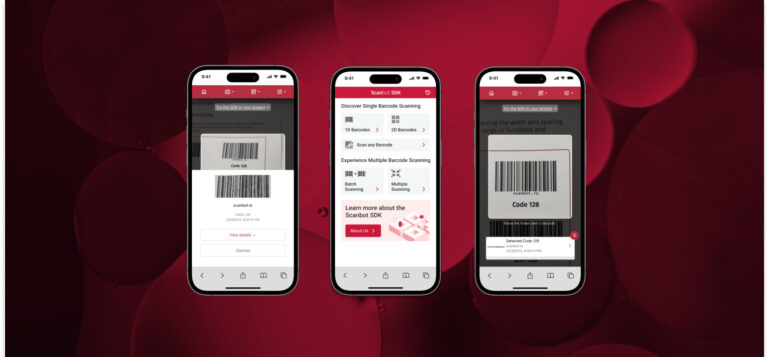
Enterprise-grade scanning with the Scanbot Web Barcode Scanner SDK
Scanbot SDK is one of those commercial solutions. Unlike free solutions, the SDK comes with a technical support team ready to assist when you’re experiencing any issues.
The Scanbot Barcode Scanner SDK offers wide barcode support, including 1D, 2D barcodes, and postal symbologies. Additionally, it offers multiple parsers for formats such as GS1 Application Identifiers, VINs, and boarding passes.
All data is processed locally on the device, ensuring compliance with GDPR and CCPA privacy regulations.
Curious to test our SDK yourself? Try out the demo app or request a free trial license to set up our scanner in your own project.
Setting up the Scanbot SDK
Integration is straightforward.
If you want to build your own barcode scanning app in just a few minutes, you can do so thanks to the Web Barcode Scanner SDK and its ready-to-use UI components.
First, create an index.html with some boilerplate code.
<!DOCTYPE html>
<html lang="en">
    <head>
        <meta charset="UTF-8" />
        <meta
            name="viewport"
            content="width=device-width, initial-scale=1.0, maximum-scale=1.0, user-scalable=0"
        />
        <title>Web Barcode Scanner</title>
    </head>
    <body>
    </body>
</html>
To set up your barcode scanner, do the following:
- Create a button that calls up the scanning interface when clicked.
- Include a
<p>element on the page for displaying the scanning result. - Import the Scanbot Web SDK using a CDN.
- Process the scan result before displaying it on the page.
The result will look something like this:
<!DOCTYPE html>
<html lang="en">
    <head>
        <meta charset="UTF-8" />
        <meta
            name="viewport"
            content="width=device-width, initial-scale=1.0, maximum-scale=1.0, user-scalable=0"
        />
        <title>Web Barcode Scanner</title>
    </head>

    <body style="margin: 0">
        <button id="start-scanning">Start scanning</button>
        <p id="result"></p>
        <script type="module">
            import "https://cdn.jsdelivr.net/npm/scanbot-web-sdk@7.0.0/bundle/ScanbotSDK.ui2.min.js";
            const sdk = await ScanbotSDK.initialize({
                enginePath:
                    "https://cdn.jsdelivr.net/npm/scanbot-web-sdk@7.0.0/bundle/bin/barcode-scanner/",
            });
            document
                .getElementById("start-scanning")
                .addEventListener("click", async () => {

                    const config =
                        new ScanbotSDK.UI.Config.BarcodeScannerScreenConfiguration();

                    const scanResult = await ScanbotSDK.UI.createBarcodeScanner(config);
                    if (scanResult?.items?.length > 0) {
                        document.getElementById("result").innerText =
                            `Barcode type: ${scanResult.items[0].barcode.format} \n` +
                            `Barcode content: "${scanResult.items[0].barcode.text}" \n`;
                    } else {
                        document.getElementById("result").innerText = "Scanning aborted by the user";
                    }
                });
        </script>
    </body>
</html>
You can then simply open the file in your browser or serve it via localhost to get started scanning barcodes.
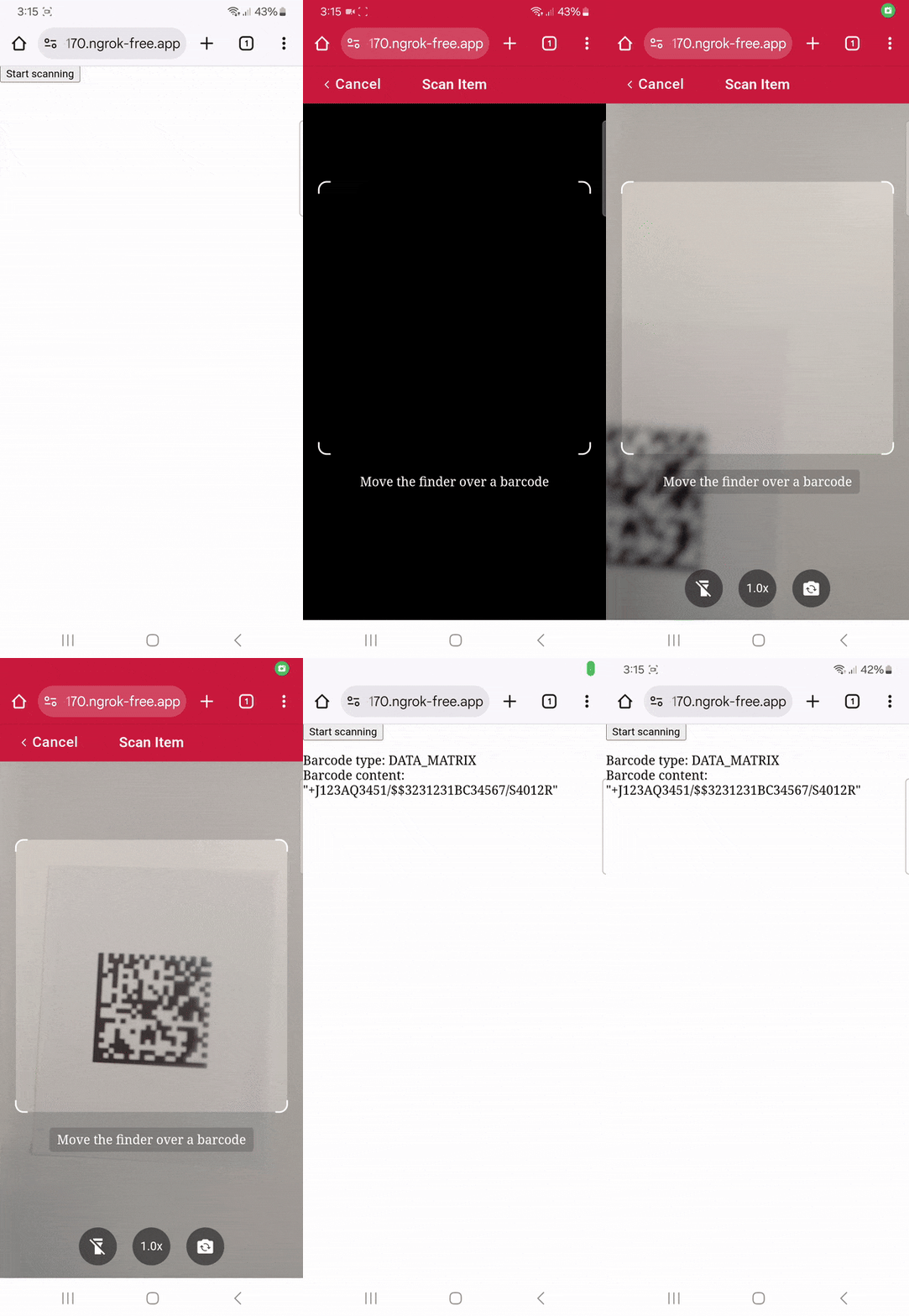
To learn more about how to customize the barcode scanner, head over to the documentation.
Happy scanning! 🤳
FAQ
Which barcode scanner library should I choose for my web environment?
For experiments, both Quagga2 and html5-qrcode are appropriate options. If you need barcode support for both 1D and 2D barcodes, html5-qrcode is the better choice as Quagga2 only scans 1D barcodes. However, its development is more active than html5-qrcode that is in maintenance mode.
For barcode scanners used in production, commercial solutions are the safer option. The Scanbot Barcode Scanner SDK offers reliable performance and enterprise support.
Is open-source software data secure?
Both Quagga2 and html5-qrcode process the barcode data locally in the browser. However, developers are responsible for handling scanned data securely. Be aware that the nature of open source means the risk of bad actors modifying code with bad intent.
What should I consider when choosing barcode scanning software?
When selecting a barcode scanning library, several factors are important:
Real-world performance: Consider how well the scanner handles challenging conditions, such as low-light environments, damaged or dirty barcodes, poorly printed labels, and different angles. Test the scanner under all possible scenarios your users might encounter.
Software continuity: Look at how actively the library is maintained. Regular updates are crucial for compatibility with new operating systems, browser changes, and new devices. Libraries with ongoing community support or official maintenance are less likely to break over time.
Barcode coverage: Ensure the library supports the types of barcodes your project requires, whether 1D, 2D, or specialized formats.
Support and troubleshooting: Check whether issues reported by users are addressed, either through an active community, GitHub repository, or commercial support. If there is no official support you can rely on, unexpected issues in production can become costly.
Balancing these considerations will help you choose a library that meets both technical needs and long-term reliability.