In 2021, the Icelandic grocery store chain Krónan added a Scan & Go feature to its mobile app. At that point, the app already supported in-store pickups and home deliveries, so adding functionalities for customers shopping at its 26 locations was a logical next step.
The Krónan team put a lot of thought into making the mobile app as useful as possible. As Hörður Már Jónsson, Head of Digital Development at Krónan, puts it:
“When developing the mobile app, our focus was always on how we could make our customers’ lives easier. On how we can help them with their grocery shopping.”
Hörður Már Jónsson, Head of Digital Development at Krónan
This philosophy makes itself felt across the entire grocery shopping experience, from the moment customers enter a store to when they write their shopping list for the next visit.
In the following sections, we will dive deeper into the behind-the-scenes technology that makes Scan & Go at Krónan such a seamless experience.
Executive summary
Key features of Krónan’s Scan & Go
- The app automatically identifies the correct store via location services.
- Product availability, discounts, and locations are updated to reflect the current store.
- Customers can add products, including fresh produce, in several ways: by scanning the barcode or the shelf label, or by searching for it by name.
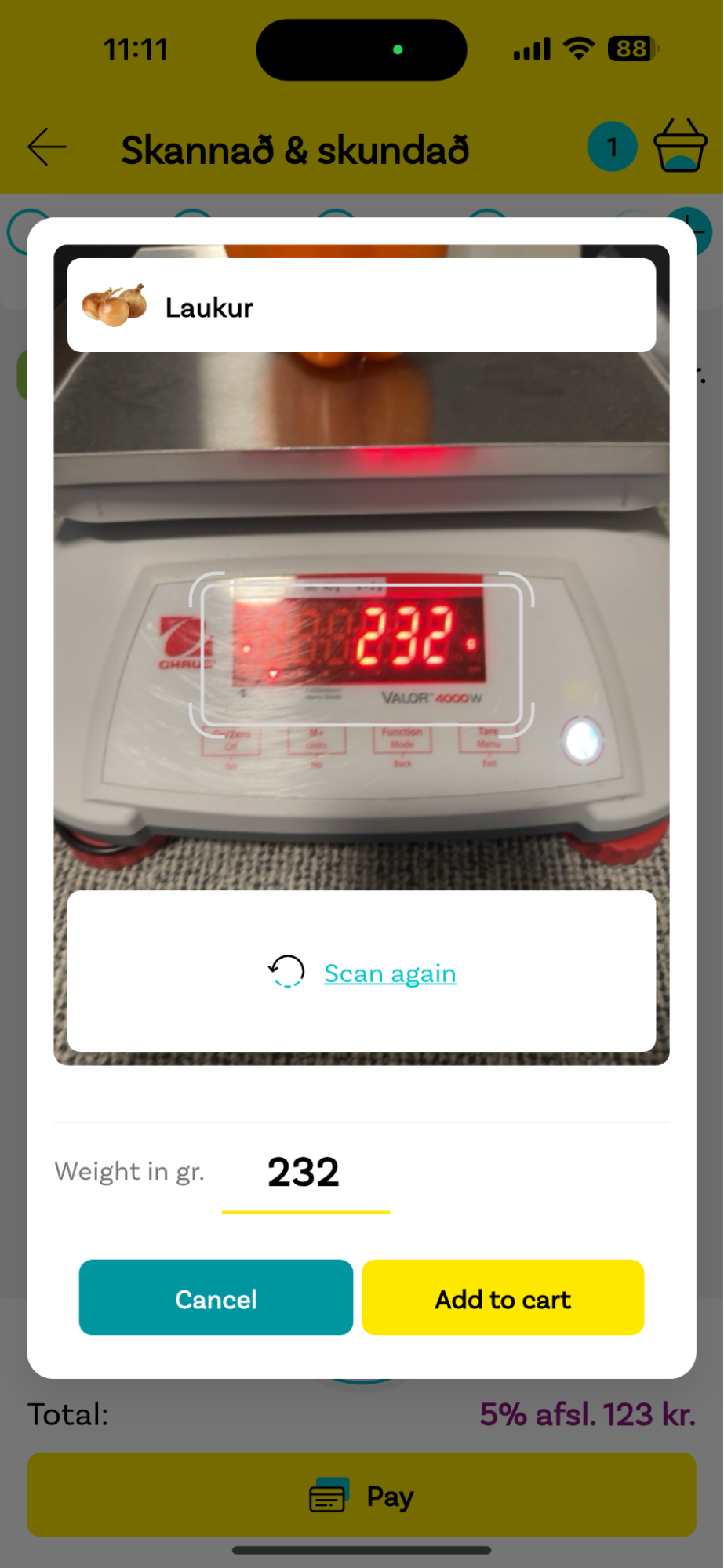
- For fresh products that need to be weighted, the app can use the camera to read the scales’ display. It also accepts manual input.
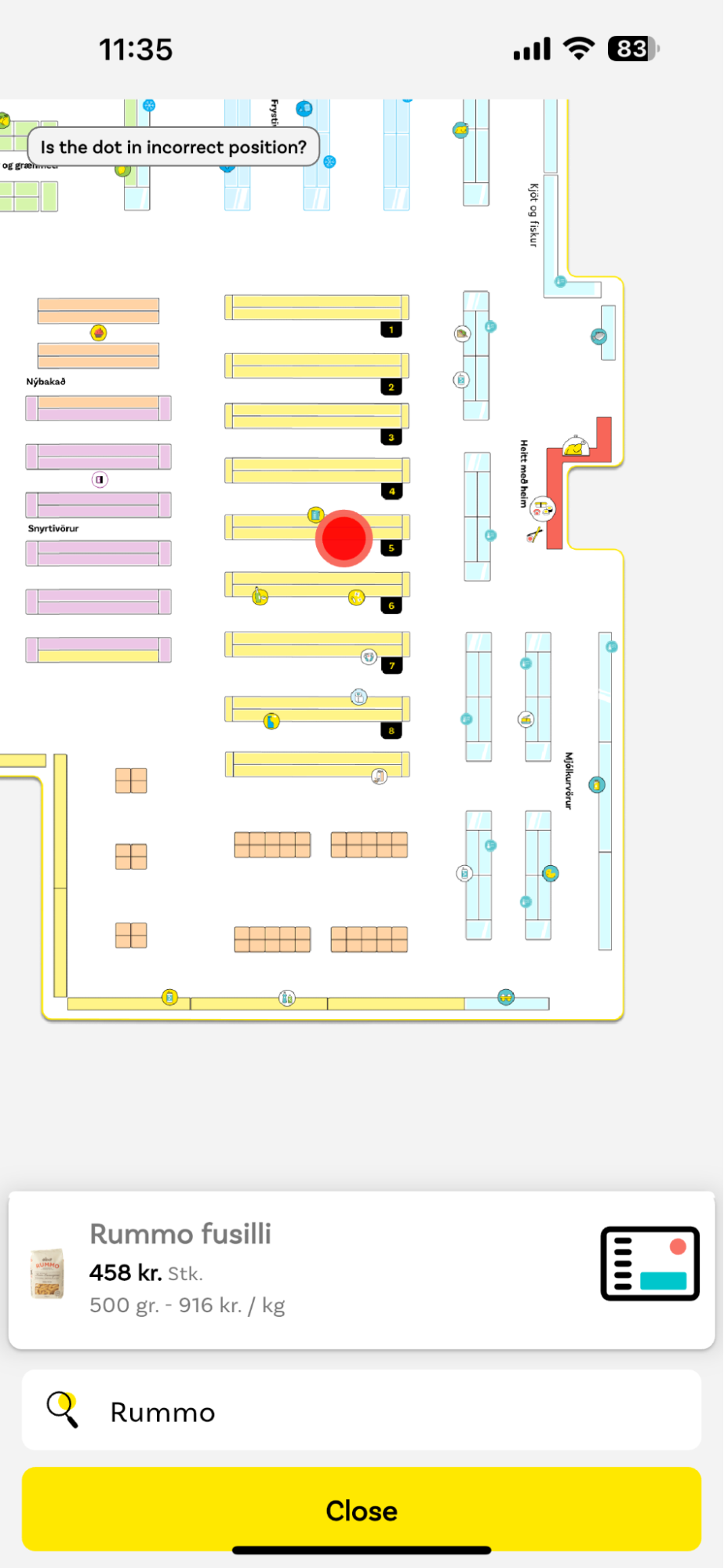
- A store map can display the location of any item. Additionally, the product’s electronic shelf label can be set to blink to help the customer find it.
- Customers can create smart shopping lists, which are automatically updated with each scan.
- The app displays product recommendations based on data such as the last time the customer bought a product and their current location in the store.
- At checkout, the app generates a QR code, which is scanned near the store exit.
- Krónan uses random checks to combat self-checkout theft and has generally received positive feedback on this.
Key improvements introduced by the Scanbot SDK
- The scanning screen’s viewfinder restricts scanning to barcodes inside the rectangle.
- Only barcodes close to the camera are scanned, which prevents inadvertently adding products to the basket.
- The SDK supports the popular DataBar barcode symbology. Scanning these high-capacity codes allows store workers to check which product batches should not be sold anymore and remove them, among other things.
- The Scanbot SDK support for Flutter enables seamless cross-platform development.
Future outlook
- Scan & Go helps Krónan maintain its high service quality while it continues its growth trajectory.
- Krónan is actively looking for more ways to improve its mobile app with the Scanbot SDK and plans to use the scanner in other areas as well, e.g., for in-store pickups.
1. Entering the store
When a customer opens the Krónan app, it automatically detects the correct store using their phone’s location services. This updates the available products and applies any store-specific discounts. The app also has access to the store’s layout, which comes in handy for several of its features.
Alternatively, customers can select the store from a list. If it doesn’t match the actual location, this will be automatically corrected at checkout to ensure the accuracy of the store’s stock information.
Scanning fresh produce
The first section of every Krónan store is fruits and vegetables. These products are a challenge for Scan & Go implementations, since they mostly come without packaging and often need to be weighed. Krónan solved this by giving its customers multiple options to add fruits and vegetables to their virtual shopping basket: manually entering the amount of pieces or the weight, scanning the weight off a scale, or scanning the barcode on the electronic shelf label or the product itself, if available.
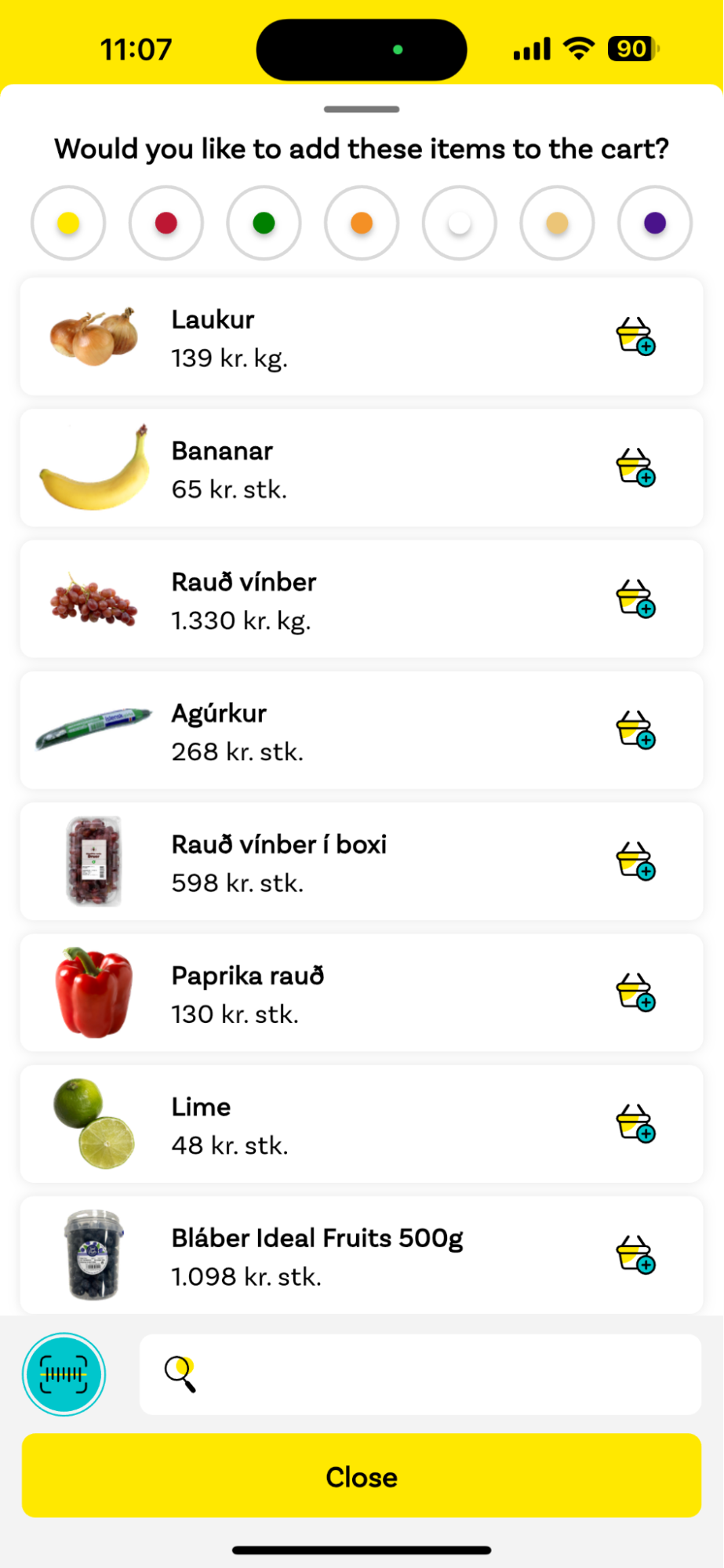
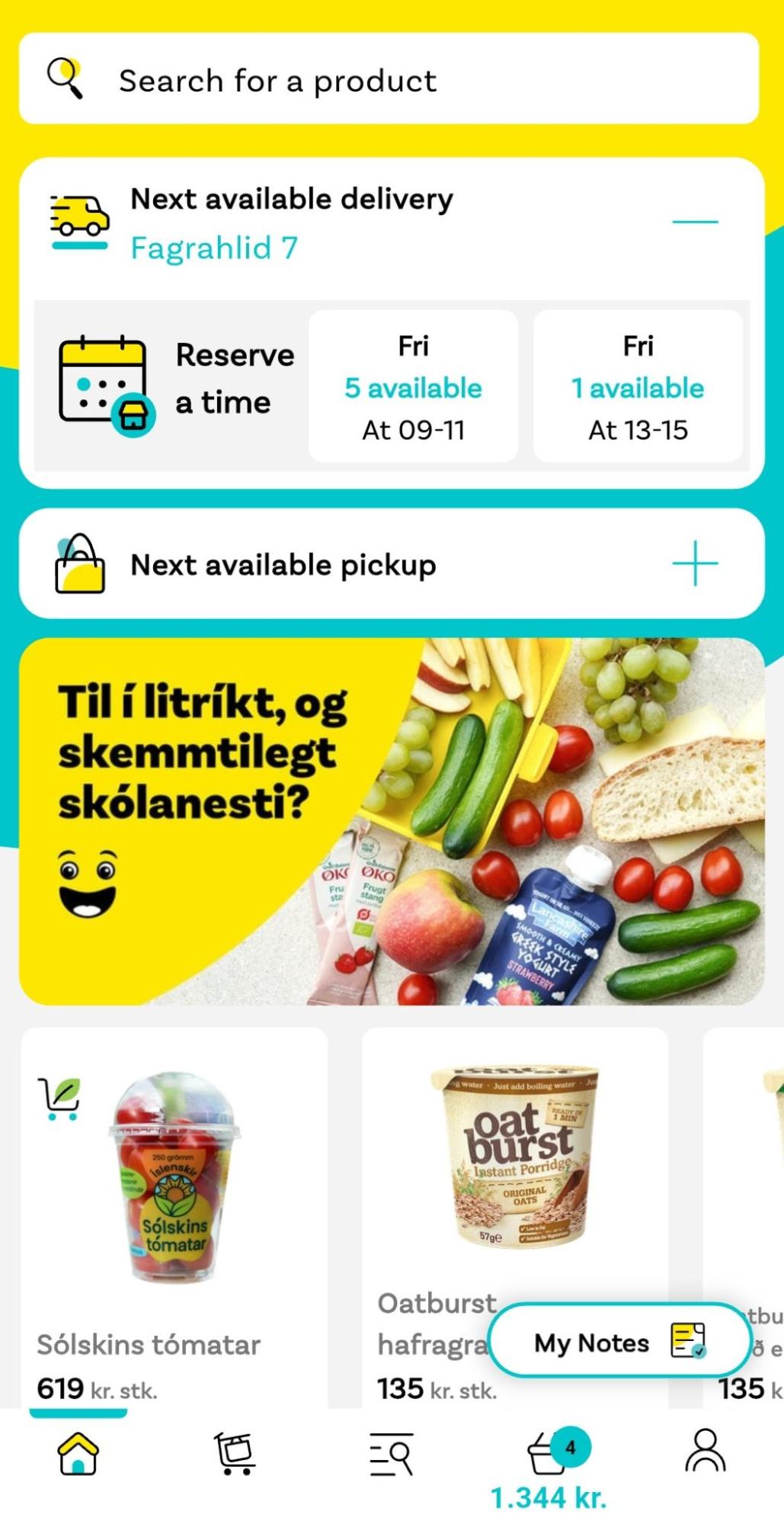
Tapping on a button calls up a list of all fruits and vegetables available at that specific store. By default, it is ordered by how frequently the customer has bought the items in the past. They can also filter the list by color or find a product using the search bar.
If the customer needs to weigh an item, they can use one of the store’s scales and scan the number displayed on the scale with the app or enter it manually.
2. Browsing the aisles
The Krónan app allows customers to create a shopping list in advance. This list is automatically sorted in the order they’ll come across the products in the store. With each visit, the sorting algorithm updates to reflect the actual route the customer usually takes.
If a customer cannot find a product, they can tap on an icon to call up a store map to check its exact location.
Similarly, if customers are not using the shopping list feature, they can search for any product in the app to look up its location.
Scanning barcodes with the Scanbot SDK
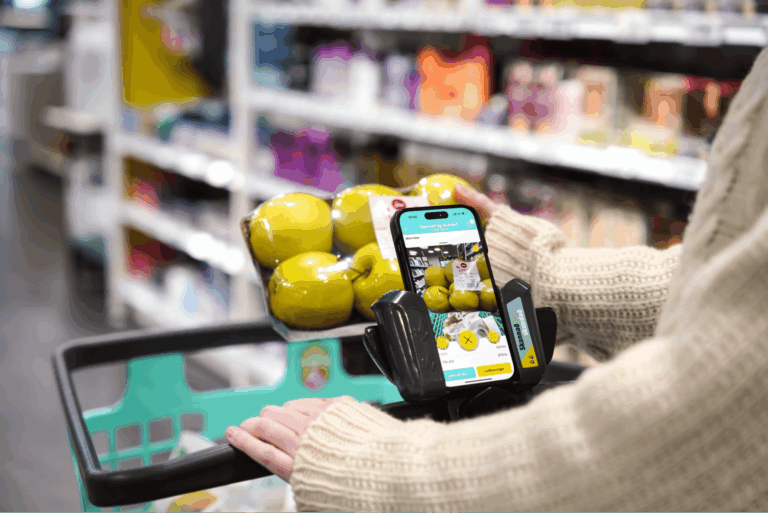
When a customer has found the product they were looking for, it’s time to scan. The barcode scanner button is placed prominently on the main screen and is easy to reach even when the phone rests in the designated holder on Krónan’s shopping carts.
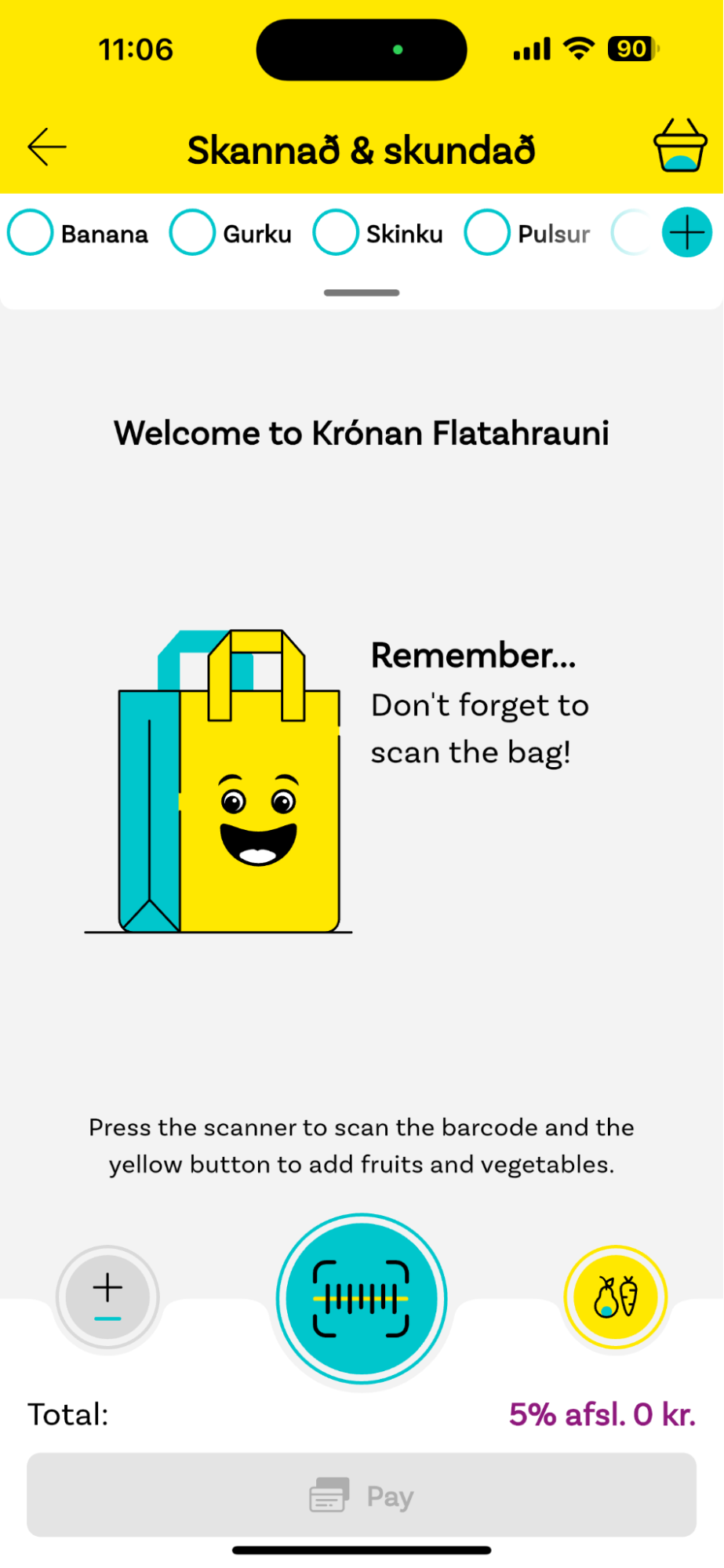
The barcode scanner interface takes up most of the screen but leaves enough room for other UI elements, so the customer can always easily switch to the app’s other functions.
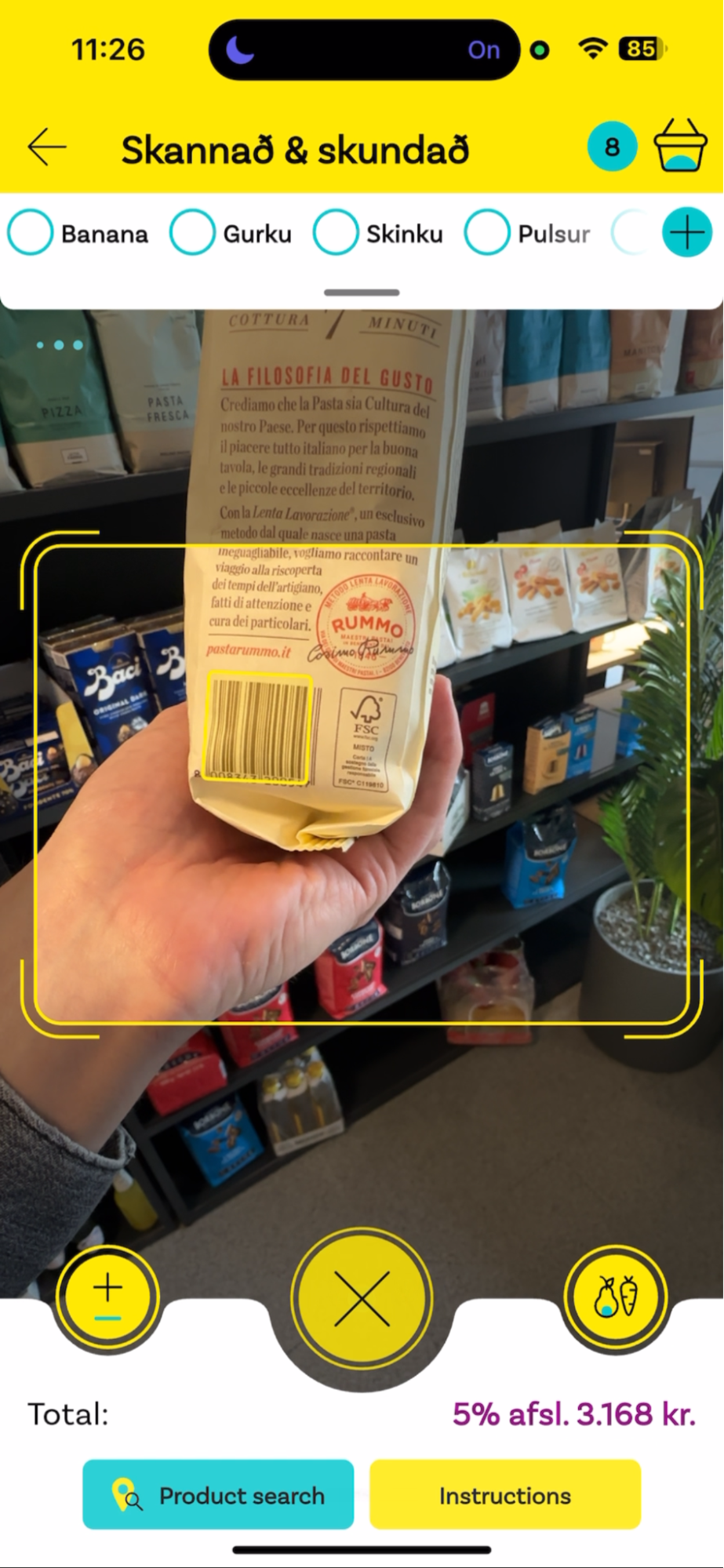
The app displays a rectangular viewfinder in the center – one of the key improvements the Scanbot SDK introduced into the Krónan app. Now, only barcodes inside the viewfinder are scanned, which significantly reduces unintended scans. The app also highlights the recognized barcode with an overlay before decoding it, clearly communicating to the user what is being scanned.
With the previous solution, customers sometimes inadvertently scanned products already in their shopping carts or even barcodes on the shelves. They then had to manually remove them.
To further improve the user experience of the barcode scanner, Krónan and the Scanbot SDK team collaborated on a feature to ignore barcodes that take up less than a specified percentage of the screen. This means that even when barcodes do enter the viewfinder, they are ignored unless they’re close to the camera.
“Only when we switched to the Scanbot SDK did we realize how many issues there were with the previous scanning solution. Now we’re excited to use the barcode scanner in other areas as well, for example when scanning out bags for pickup orders.”
Hörður Már Jónsson, Head of Digital Development at Krónan
When the customer scans a product, it gets added to their digital basket and removed from the shopping list.
The app also allows customers to have a free-text shopping list. Krónan’s custom algorithm sorts this list according to where the products are in the specific store. This is done by mapping the free-text items to individual products with the help of the customers.
Shopping list magic
Krónan customers can use the mobile app to create shopping lists by manually selecting specific products. But the app also offers a free-text option, which leaves the exact wording of each item to them.
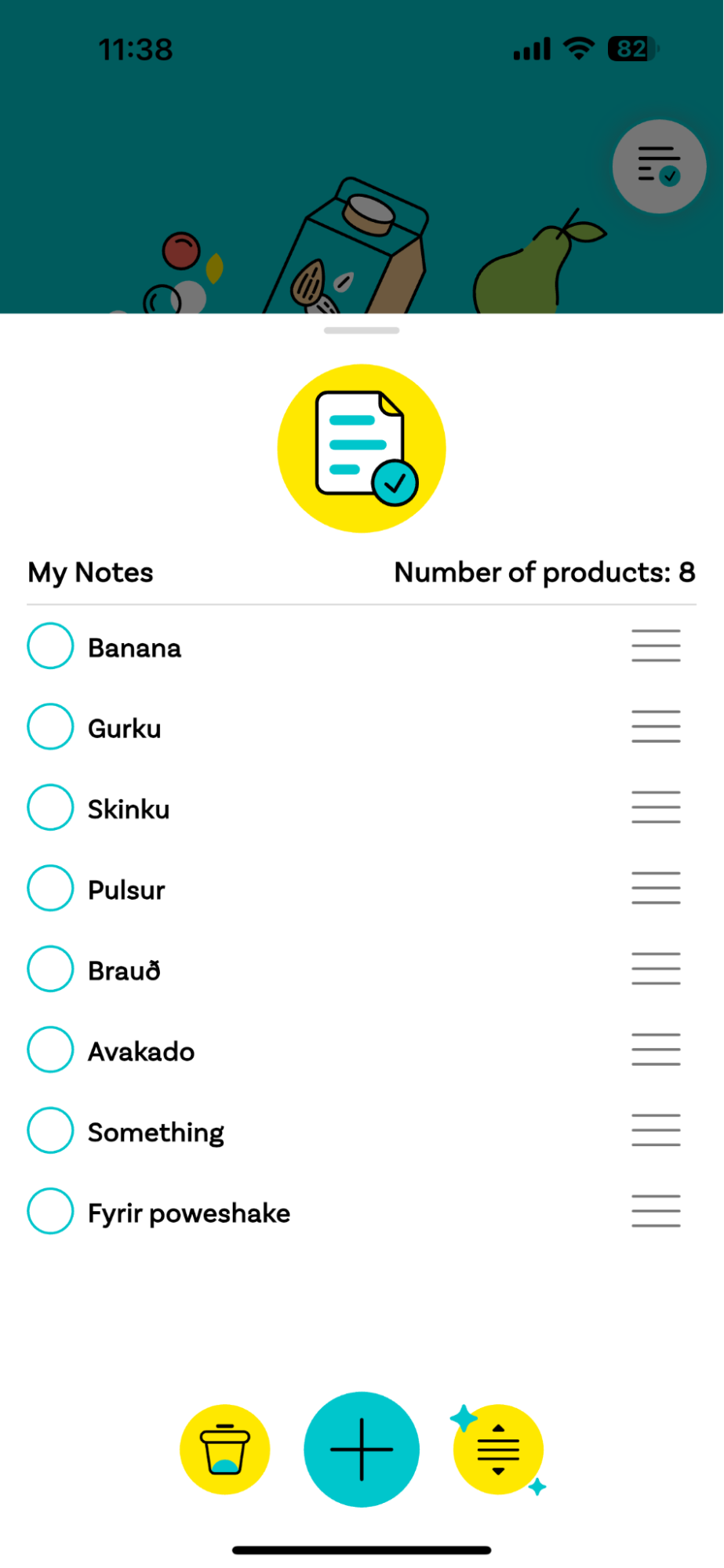
Tapping on the magic sorting button at the bottom updates the order to align with the customer’s current likely route through the store. But how does that work with free-form entries?
For non-branded products like fruits and vegetables, the Krónan app recognizes common terms and maps them to the store’s products. For the rest, if the customer checked the term off their list once before, the app checks which product they scanned beforehand and maps it to the term. This information is then remembered for future free-text product mapping.
Recommending other products to the customer
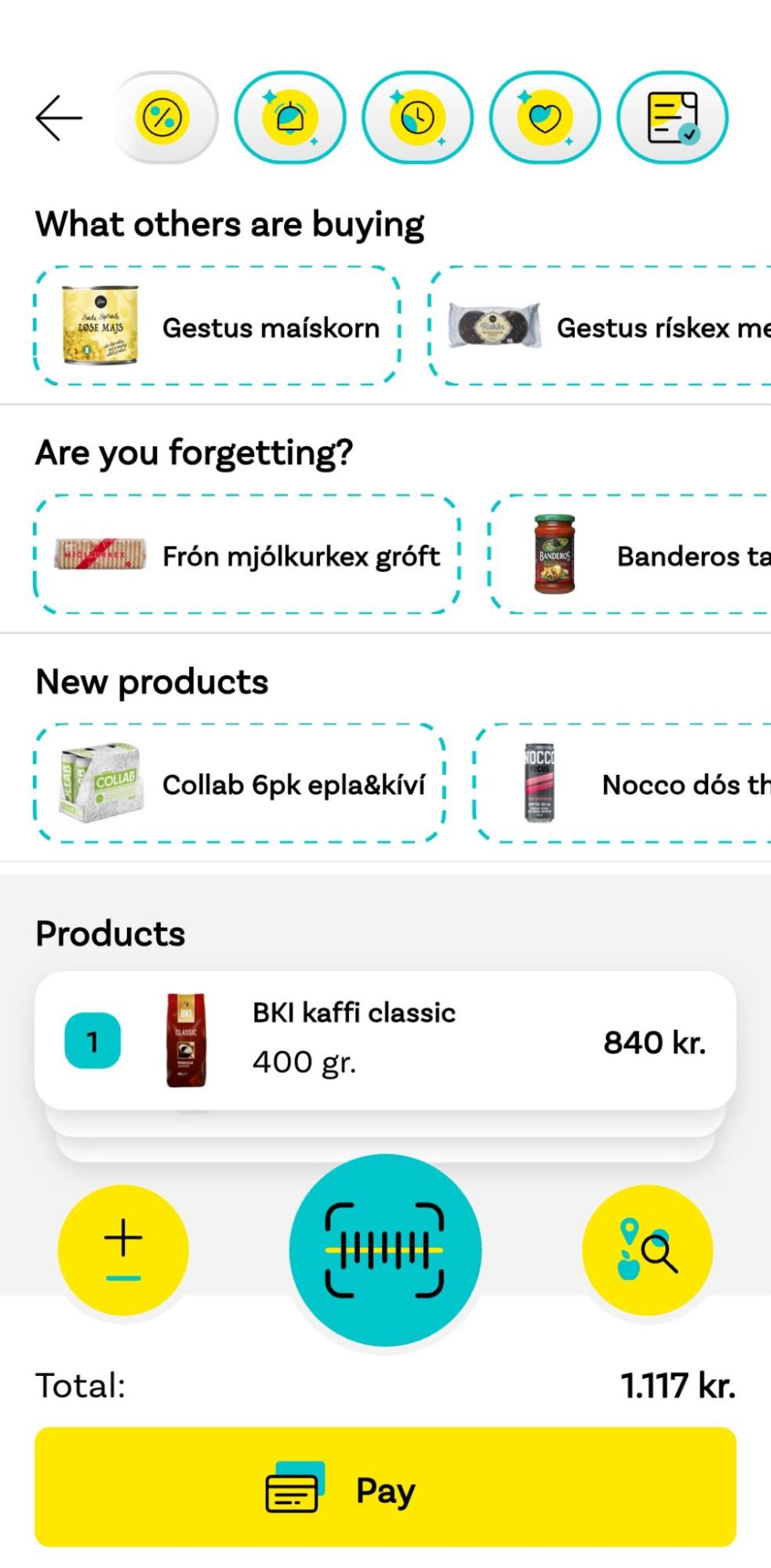
Product recommendations are an integral part of the Krónan app and are displayed at the top of the screen. These recommendations are generated in various ways:
- The Krónan app keeps track of the intervals at which a customer repurchases a product. It then recommends the product again at these intervals.
- If a customer has bought a product frequently, but then doesn’t repurchase it for a while, the app recommends giving it another try.
- If there’s a product a customer buys almost every time they visit the store, it gets recommended whenever they don’t.
- The app also recommends products that other customers with similar tastes have bought and products that are likely missing in the current cart. It does so using an algorithm trained on the baskets of other Krónan customers.
Of course, it’s up to the customer to decide whether to provide the data for these recommendations to Krónan.
3. At the checkout
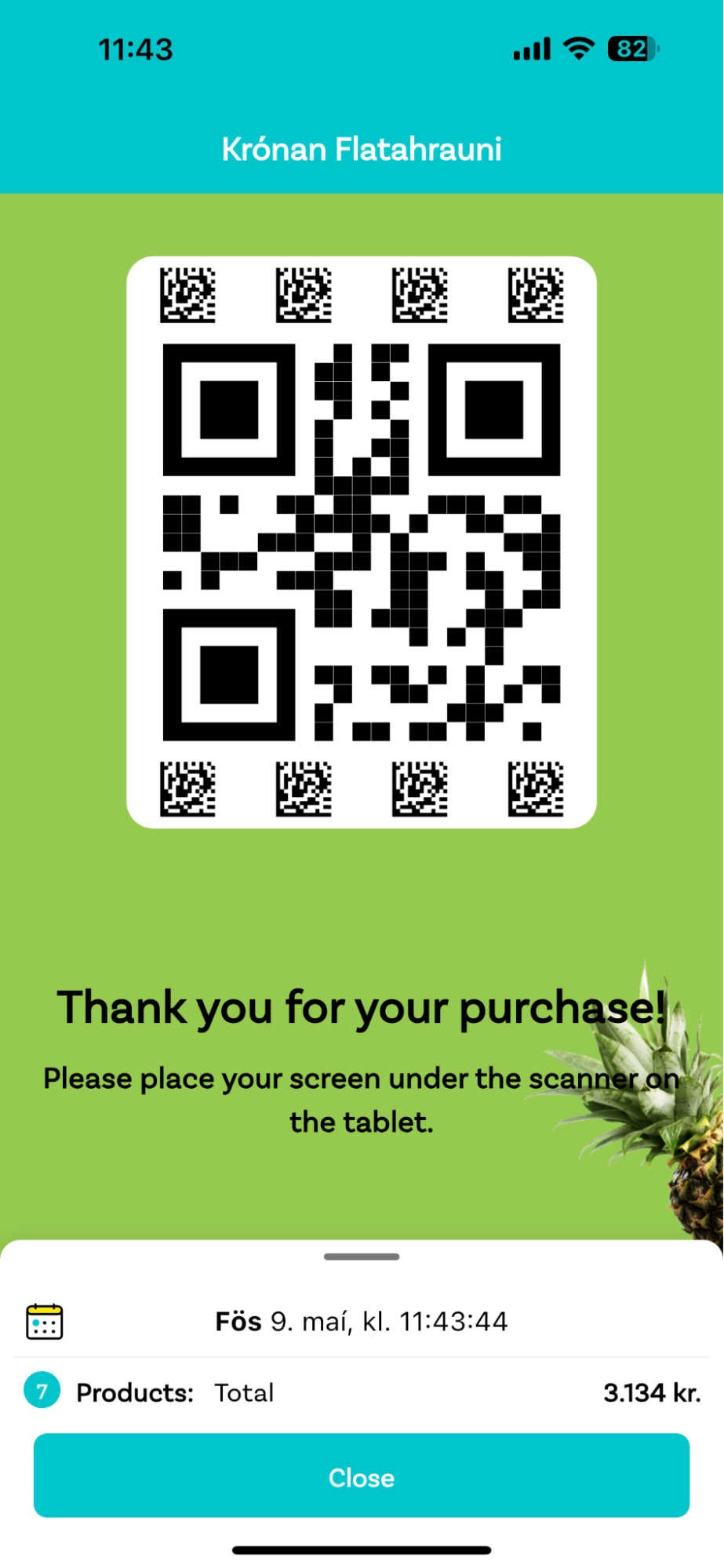
Customers can pay in the app using their credit card details or Apple Pay. The app then generates a QR code. By holding it up to a scanner near the exit, the customer finishes their store visit.
This last step is also crucial for psychological reasons, as Krónan’s Head of Digital Development notes:
“In the beginning, we didn’t have this final checkout step with the QR code. Customers just paid in the app and walked out.
Hörður Már Jónsson, Head of Digital Development at Krónan
But they felt uneasy. Sometimes other customers would even try to stop them from leaving the store. So we realized we needed to make the customers feel validated by adding this final step.”
Combatting self-checkout theft
A common challenge of implementing Scan & Go is dealing with the increased theft risk. Krónan tackled this issue by introducing random checks. For every customer, there’s a chance at checkout that an employee is notified, who will then scan a few items from the customer’s shopping cart. If there’s an item that hadn’t been scanned with the app, the payment process is canceled and the customer is asked to use a till or self-checkout lane instead.
According to Jónsson, feedback from Krónan customers has mainly been positive, but training employees so they know precisely how to behave in these situations is critical.
“You need to make sure store managers train their employees properly to keep the customer journey as pleasant as possible.”
Hörður Már Jónsson, Head of Digital Development at Krónan
Scan & Go with the Scanbot SDK: A growth driver for Krónan
Krónan was founded in 2000 and is continuing to grow. Rolling out Scan & Go across their stores has helped the retailer absorb the sharp rise in customer numbers without sacrificing service quality. As Jónsson puts it:
“Without Scan & Go, we wouldn’t have been able to handle the same number of customers with our existing infrastructure. The queues would have been crazy.”
Hörður Már Jónsson, Head of Digital Development at Krónan
The Scanbot SDK was the right solution at the right time. It eliminated the issues caused by the previous barcode scanning tool – issues that had held back Krónan’s Scan & Go feature. The SDK’s ability to read DataBar codes – which are appearing on more and more produce – lets the app provide POS systems with much more information about individual products. For instance, this enables Krónan to offer discounts on products with approaching best-before dates.
“DataBar is the future. I think it will be very popular, replacing the traditional barcode.”
Hörður Már Jónsson, Head of Digital Development at Krónan
Under the hood, the Krónan app makes use of the SDK’s support of the Flutter mobile development framework, which enables the team to use the same code base for the app’s iOS and Android versions. This significantly reduces the time and costs involved in further development and maintenance.
On the customers’ side, scanning barcodes is now much more user-friendly, and there are far less failed and accidental scans. Advanced features like the viewfinder and the barcode-to-screen ratio threshold ensure they always feel in control when using Scan & Go.
The Krónan team also learned how important it is that customers can comprehend what is happening on screen when they scan a product. On high-end devices, scanning was sometimes too fast for customers to follow, especially after Krónan switched to the Scanbot SDK. To rectify this, the team introduced a minimum delay between recognizing a barcode and closing the scanning screen.
Now that the new scanner has been successfully rolled out, Hörður Már Jónsson and his team are looking forward to continued collaboration with Scanbot SDK:
“The barcode scanner really makes our Scan & Go feature shine. The Scanbot SDK team has been very helpful, and the engineers are always so quick to respond. Now we’re excited to use the scanner for even more use cases.”
Hörður Már Jónsson, Head of Digital Development at Krónan